Practise 16 exam-style questions on The USB interface for Cambridge IGCSE Computer Science (Paper 1). Write your answer as you would in the exam and get it marked in seconds against the mark scheme, point by point, with an AI tutor on hand if you get stuck.
16 questions
1–6 marks each
Instant marking
No sign-up needed
16 questions, marked as you go
Sample questions with model answers
Here are 4 of the questions in this topic, each with a model answer, an explanation of why it earns the marks and the mark scheme an examiner would use.
Question 1
1 mark
When a USB device is plugged into a computer, the computer loads a piece of software so that it can communicate with the device.
Name this type of software.
Model answer
A device driver.
Explanation
A device driver tells the operating system how to communicate with a particular device. When a USB device is plugged in, the computer recognises it and loads the matching driver automatically, or asks the user to download it if it is not available.
Mark scheme
1 mark
Device driver
accept 'driver'; do not accept 'operating system' or 'firmware'
Question 2
2 marks
A standard USB 2.0 cable contains four wires.
State the purpose of these wires.
Model answer
Two of the wires supply power to the device (a +5 V wire and an earth wire), and the other two wires carry the data.
Explanation
A USB 2.0 cable has two wires for power and two for data. This is why a USB port can power or charge a device as well as transmitting data, and because the data is serial it needs only a few wires.
Mark scheme
1 mark
Two wires supply power to the device (+5 V and earth/ground)
accept 'two wires are for power'
1 mark
Two wires are used for data transmission
accept 'two wires carry the data'
Question 3
3 marks
A photographer wants to connect an external hard disk drive to a laptop to copy large photo files.
Explain why the USB interface is suitable for this.
Model answer
When the photographer plugs the drive in, the laptop detects it and loads the driver automatically, so no technical knowledge is needed. Modern USB versions transfer data quickly, so large photo files can be copied in a short time. The USB cable can also power the drive, so the photographer does not need a separate power supply when working away from a mains socket.
Explanation
For 'explain why it is suitable', link each benefit of USB to the scenario: large files need a fast transfer rate, a laptop user benefits from the drive being powered by the cable, and automatic detection makes it easy to use.
Mark scheme
1 mark
The drive is detected automatically and its driver is loaded, so the photographer does not need technical knowledge
max 3
1 mark
Modern USB versions have fast data transfer rates, so large photo files are copied quickly
1 mark
The USB cable can power the drive, so no separate power supply is needed (useful away from a mains socket)
1 mark
USB is an industry standard, so the drive will work with the laptop (and with other computers)
1 mark
USB is backward compatible, so the drive works even if the laptop has an older USB port
Question 4
4 marks
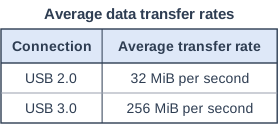
The table shows the average data transfer rates of two USB connections. A user copies a 4 GiB video file to an external drive.
Calculate how many seconds faster the file is copied using the USB 3.0 connection than using the USB 2.0 connection. Show your working.
Convert the file size into the same unit as the transfer rates first (GiB to MiB by multiplying by 1024), then divide by each rate to find the time taken. The question asks how much faster, so subtract the two times; giving just one time is a common way to lose marks.
Mark scheme
1 mark
4 GiB = 4 × 1024 = 4096 MiB
1 mark
USB 2.0: 4096 ÷ 32 = 128 seconds
follow through from an incorrect conversion
1 mark
USB 3.0: 4096 ÷ 256 = 16 seconds
follow through from an incorrect conversion
1 mark
112 (seconds faster)
128 − 16; follow through; do not accept an answer using 1000
Ready to try the rest? Every answer you write is marked against the mark scheme, so you can see exactly where the marks are.
Ctrl + Enter to check
AI TutorHints first, answers after you try
Hi! Stuck? Ask me for a hint and I’ll help you work it out. Once you’ve checked your answer I can explain exactly where the marks are.