Practise 24 exam-style questions on Primary storage: RAM and ROM for Cambridge IGCSE Computer Science (Paper 1). Write your answer as you would in the exam and get it marked in seconds against the mark scheme, point by point, with an AI tutor on hand if you get stuck.
24 questions
1–6 marks each
Instant marking
No sign-up needed
20 questions, marked as you go
Sample questions with model answers
Here are 4 of the questions in this topic, each with a model answer, an explanation of why it earns the marks and the mark scheme an examiner would use.
Question 1
1 mark
State the name given to the set of start-up instructions stored in ROM that the CPU runs when a computer is switched on.
Model answer
The bootstrap.
Explanation
The bootstrap (part of the BIOS firmware) is a small program stored in ROM. It runs first when the computer is switched on and loads the operating system from secondary storage into RAM.
Mark scheme
1 mark
Bootstrap (loader)
accept 'BIOS' or 'boot program'; do not accept 'operating system'
Question 2
2 marks
Describe the role of ROM in a computer.
Model answer
ROM stores the start-up instructions (the bootstrap) that the CPU needs as soon as the computer is switched on, so that it can check the hardware and load the operating system. ROM is non-volatile and read-only, so these instructions are kept permanently and cannot be changed.
Explanation
ROM holds the small set of instructions needed to get the computer started. They must be there the moment the power comes on, and must not be changed, so non-volatile, read-only memory is ideal. Do not say ROM stores the operating system: the OS is on secondary storage and is loaded into RAM by the start-up instructions.
Mark scheme
1 mark
Stores the start-up instructions / bootstrap / BIOS / firmware
max 2
1 mark
That the CPU needs as soon as the computer is switched on (to start the computer and load the operating system)
1 mark
Stores them permanently: non-volatile, so not lost when the power is off / read-only, so they cannot be changed
Question 3
3 marks
Amir is typing an essay on his computer when there is a power cut. When the power returns, he switches the computer back on. It starts up normally, but the changes he made to his essay since he last saved it have been lost.
Explain why.
Model answer
While Amir was editing, his essay and the unsaved changes were held in RAM. RAM is volatile, so everything in it was lost when the power was cut. The computer still started because the start-up instructions are stored in ROM, which is non-volatile, so they were not affected by the power cut.
Explanation
The scenario contrasts the two kinds of primary storage: volatile RAM lost the unsaved work, non-volatile ROM kept the start-up instructions. The last saved version survived because saving writes it to secondary storage, which is also non-volatile.
Mark scheme
1 mark
The unsaved changes/the essay being edited were held only in RAM
1 mark
RAM is volatile, so its contents were lost when the power was cut
1 mark
The start-up instructions are stored in ROM, which is non-volatile, so they were not lost and the computer could start
Question 4
4 marks
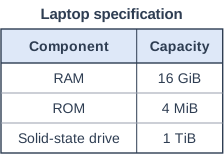
The table shows the specification of a laptop.
Calculate how many times larger the RAM is than the ROM, and explain why the RAM needs to be so much larger than the ROM. Show your working.
Model answer
16 GiB = 16 × 1024 MiB = 16 384 MiB 16 384 ÷ 4 = 4096 The RAM is 4096 times larger than the ROM.
The RAM has to hold the operating system, all the applications that are open and the data being used, which together take up a lot of space. The ROM only has to hold the small set of start-up instructions (the bootstrap), so it needs very little capacity.
Explanation
Convert both values to the same unit before dividing: 1 GiB = 1024 MiB, never 1000. The size difference reflects their roles: RAM is the working memory for everything in use, while ROM holds just enough instructions to start the computer.
Mark scheme
1 mark
16 GiB = 16 × 1024 = 16 384 MiB
working: converting to the same unit
1 mark
16 384 ÷ 4 = 4096 (times larger)
do not accept an answer using 1000 (e.g. 4000)
1 mark
RAM must hold the operating system, applications and data currently in use, which are large / many at once
1 mark
ROM only needs to hold the small start-up program/bootstrap
Ready to try the rest? Every answer you write is marked against the mark scheme, so you can see exactly where the marks are.
Ctrl + Enter to check
AI TutorHints first, answers after you try
Hi! Stuck? Ask me for a hint and I’ll help you work it out. Once you’ve checked your answer I can explain exactly where the marks are.