The internet, the world wide web, URLs and HTTP(S)
Practise 26 exam-style questions on The internet, the world wide web, URLs and HTTP(S) for Cambridge IGCSE Computer Science (Paper 1). Write your answer as you would in the exam and get it marked in seconds against the mark scheme, point by point, with an AI tutor on hand if you get stuck.
26 questions
1–6 marks each
Instant marking
No sign-up needed
20 questions, marked as you go
Sample questions with model answers
Here are 4 of the questions in this topic, each with a model answer, an explanation of why it earns the marks and the mark scheme an examiner would use.
Question 1
1 mark
A library's website has this URL:
http://www.lakesidelibrary.org/opening-times.html
State the protocol in this URL.
Model answer
http (HyperText Transfer Protocol).
Explanation
The protocol is the first part of a URL, before the ://. Here it is http, not https, so this page would be sent without encryption.
Mark scheme
1 mark
http
accept 'http://', 'HTTP', 'HyperText Transfer Protocol'; do not accept 'https'
Question 2
2 marks
Every web server has an IP address, but people usually visit websites by typing a URL.
Explain why URLs are used instead of IP addresses.
Model answer
A URL is made of text, such as a company name, so it is much easier for people to remember and type than a string of numbers. Also, the web server's IP address may change, but the URL can stay the same because it is converted into the current IP address automatically.
Explanation
Computers need IP addresses, but humans find words easier. The domain name in a URL is looked up to find the IP address, so the address can change behind the scenes without users noticing.
Mark scheme
1 mark
A URL is text-based, so it is easier for people to remember/type/recognise than a numeric IP address
max 2
1 mark
The IP address of the web server can change but the URL can stay the same
1 mark
A URL can identify a particular web page/file (not just the server)
1 mark
The URL (domain name) is converted to the IP address automatically (by DNS), so users never need to know the IP address
Question 3
3 marks
A student types a URL into a web browser to view a web page that uses HTTP.
Describe how HTTP is used to obtain and display the web page.
Model answer
The web browser sends an HTTP request for the web page to the web server. The web server receives the request, finds the file and sends back an HTTP response containing the HTML for the page. The browser then renders the HTML and displays the web page.
Explanation
HTTP works by request and response: the browser (client) asks, the web server answers. The response contains the page's HTML (or a status code such as 'not found'), which the browser renders. The steps must be in a sensible order.
Mark scheme
1 mark
The web browser (client) sends an HTTP request (e.g. a GET request) for the web page to the web server
max 3
1 mark
The web server receives the request and finds/locates the requested web page/file
1 mark
The web server sends back an HTTP response containing the web page (HTML) / a status code (e.g. page not found)
accept '404 error if the page does not exist'
1 mark
The web browser renders/interprets the HTML and displays the web page
Question 4
4 marks
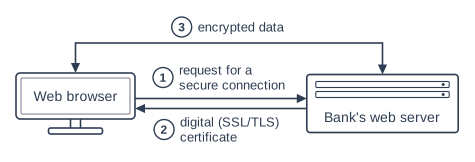
The diagram shows what happens when a web browser connects to a bank's website using HTTPS.
Describe what the web browser does with what it receives at step 2, and explain why the data at step 3 is encrypted.
Model answer
At step 2 the browser receives the bank's digital (SSL/TLS) certificate. It checks that the certificate is valid and was issued by a trusted certificate authority, which proves the web server really belongs to the bank. If it is accepted, secure communication can begin. At step 3 the data is encrypted because it includes sensitive information such as login details and account balances. If anyone intercepts it, they cannot understand it without the key.
Explanation
HTTPS gives authentication (the certificate checked at step 2 proves who the server is) and confidentiality (encryption at step 3 makes intercepted data useless). Saying 'it keeps data safe' is too vague; say what happens if data is intercepted.
Mark scheme
1 mark
The browser checks/verifies the (SSL/TLS) digital certificate
max 4 overall; max 2 for step 2
1 mark
To confirm it is valid/issued by a trusted certificate authority/not expired, so the web server is authenticated (it really is the bank)
1 mark
If the certificate is accepted, the browser agrees the encryption (keys) with the server so secure communication can begin
accept 'if it is not valid the browser warns the user'
1 mark
Step 3: the data is sensitive, e.g. login details, account numbers, balances
max 2 for step 3
1 mark
If it is intercepted, it cannot be understood/read without the key
Ready to try the rest? Every answer you write is marked against the mark scheme, so you can see exactly where the marks are.
Ctrl + Enter to check
AI TutorHints first, answers after you try
Hi! Stuck? Ask me for a hint and I’ll help you work it out. Once you’ve checked your answer I can explain exactly where the marks are.