Level:
Correct: 0
Incorrect: 0
Marks: 0/0
Exam Practice
Subject:
Topics:
Cambridge IGCSE Computer Science (Paper 1) Smart practice A mixed round aimed at your weak spots
Unit 1
Data representation
Unit 2
Data transmission
Unit 3
Hardware
Unit 4
Software
Unit 5
The internet and its uses
Unit 6
Automated and emerging technologies
Automated systems
Automated systems
0%
Artificial intelligence
0%
Avg
score:
–
Topics
done:
0/39

Representing images

Practise 24 exam-style questions on Representing images for Cambridge IGCSE Computer Science (Paper 1). Write your answer as you would in the exam and get it marked in seconds against the mark scheme, point by point, with an AI tutor on hand if you get stuck.

  • 24 questions
  • 1–6 marks each
  • Instant marking
  • No sign-up needed
20 questions, marked as you go

Sample questions with model answers

Here are 4 of the questions in this topic, each with a model answer, an explanation of why it earns the marks and the mark scheme an examiner would use.

Question 1

1 mark

The diagram shows the binary code for each row of a black and white bitmap image, next to an empty grid of the same size. In the key, 0 represents white and 1 represents black.

Use the binary codes to identify the capital letter that the image shows.
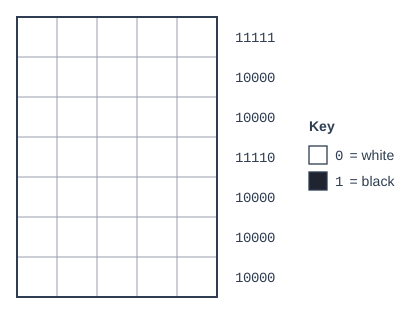
Bitmap image drawn as a grid of 5 × 7 pixels (5 wide, 7 high), each pixel white or black. A key gives the binary code of each colour: 0 = white, 1 = black. The grid is drawn empty (no pixels coloured in), for the student to complete. The binary code of each row is written beside it: row 1: 11111; row 2: 10000; row 3: 10000; row 4: 11110; row 5: 10000; row 6: 10000; row 7: 10000.

Model answer

F

Explanation

Each 1 is a black pixel and each 0 is a white pixel. The left-hand column is black in every row, the top row is all black and row 4 has four black pixels, which makes the letter F. This is how a computer rebuilds an image from its binary data.

Mark scheme
  1. 1 mark

    F

Question 2

2 marks

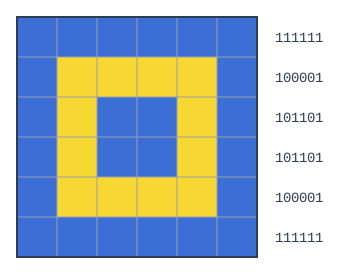
The diagram shows a bitmap image that uses two colours, and the binary code for each row.

State the colour that is represented by the binary value 1 in this image, and explain why each pixel needs only 1 bit.

Bitmap image drawn as a grid of 6 × 6 pixels (6 wide, 6 high), each pixel yellow or blue. The pixels, row by row from the top (left to right): row 1: 6 blue; row 2: blue, 4 yellow, blue; row 3: blue, yellow, 2 blue, yellow, blue; row 4: blue, yellow, 2 blue, yellow, blue; row 5: blue, 4 yellow, blue; row 6: 6 blue. The binary code of each row is written beside it: row 1: 111111; row 2: 100001; row 3: 101101; row 4: 101101; row 5: 100001; row 6: 111111.

Model answer

1 represents blue: row 1 is 111111 and all of its pixels are blue. Each pixel needs only 1 bit because the image uses just 2 colours, and 1 bit has 2 possible values, 0 and 1, one for each colour.

Explanation

Compare a row's code with its pixels: wherever there is a 1, the pixel is blue, so 0 must be yellow. With 2 colours, a colour depth of 1 bit is enough; with 3 or 4 colours, 2 bits would be needed.

Mark scheme
  1. 1 mark

    Blue

  2. 1 mark

    There are only 2 colours, and 1 bit can represent 2 different values (0 and 1)

    accept 2 to the power 1 = 2

Question 3

3 marks

Explain the effect of increasing the colour depth of an image.

Model answer

Increasing the colour depth means more bits are used for each pixel, so many more different colours can be represented. The colours in the image are therefore more accurate and it looks more realistic. However, every pixel needs more bits, so the file size increases.

Explanation

Each extra bit of colour depth doubles the number of colours: 8 bits give 256 colours and 24 bits give over 16 million. More colours give smoother, more realistic shading, but every pixel takes more bits, so the file grows.

Mark scheme
  1. 1 mark

    More bits are used to represent the colour of each pixel

    max 3

  2. 1 mark

    So more different colours can be represented

  3. 1 mark

    So the colours are more accurate / the image looks more realistic / has smoother shading

    accept 'better quality'

  4. 1 mark

    The file size increases

Question 4

4 marks

Give the missing terms A to D in this description of how an image is represented.

A bitmap image is made up of small dots called A. The colour of each dot is stored as a B number. The number of bits used to represent each colour is the C, and the number of dots in the image is the D.

Model answer

A: pixels
B: binary
C: colour depth
D: resolution

Explanation

An image is a series of pixels, each stored as a binary code. Colour depth is bits per pixel and resolution is the number of pixels; these are the two settings that control both quality and file size.

Mark scheme
  1. 1 mark

    A: pixels

    accept picture elements

  2. 1 mark

    B: binary

  3. 1 mark

    C: colour depth

    accept bit depth

  4. 1 mark

    D: resolution

Ready to try the rest? Every answer you write is marked against the mark scheme, so you can see exactly where the marks are.

AI Tutor Hints first, answers after you try

Hi! Stuck? Ask me for a hint and I’ll help you work it out. Once you’ve checked your answer I can explain exactly where the marks are.