
Level:
Correct: 0
Incorrect: 0
Marks: 0/0
Exam Practice
Course:
Topics:
OCR GCSE Computer Science (Paper 1) Smart practice A mixed round aimed at your weak spots
Unit 1
Systems architecture
Unit 2
Memory and storage
Unit 3
Computer networks, connections and protocols
Unit 4
Network security
Unit 5
Systems software
Unit 6
Ethical, legal, cultural and environmental impacts of digital technology
Avg
score:
–
Topics
done:
0/34

The Internet, DNS, hosting and the Cloud

Practise 32 exam-style questions on The Internet, DNS, hosting and the Cloud for OCR GCSE Computer Science (Paper 1). Write your answer as you would in the exam and get it marked in seconds against the mark scheme, point by point, with the Study Helper on hand if you get stuck.

  • 32 questions
  • 1–8 marks each
  • Instant marking
  • No sign-up needed
20 questions, marked as you go

Sample questions with model answers

Here are 4 of the questions in this topic, each with a model answer, an explanation of why it earns the marks and the mark scheme an examiner would use.

Question 1

1 mark

Which one of these is a disadvantage of storing files in the Cloud?

Choose your answer.

  • The files can be opened on many different devices
  • An Internet connection is needed to access the files
  • Extra storage space can be added quickly
  • The user must buy and look after their own server

Model answer

An Internet connection is needed to access the files

Explanation

Cloud files are stored on a provider's servers, so you need an Internet connection to reach them; with no connection, or a slow one, you cannot get to your files. Opening files on many devices and adding storage quickly are advantages of the Cloud. With the Cloud the provider buys and looks after the servers, not the user.

Mark scheme
  1. 1 mark

    An Internet connection is needed to access the files

    If more than one option is given, 0 marks.
Question 2

2 marks

Hamza says: 'My photos are stored in the Cloud, so they are not stored on any computer.'

Explain why Hamza is wrong.

Model answer

Hamza's photos are stored on the hard drives or SSDs of servers owned by the cloud provider, in a data centre. These servers are just somewhere else, and Hamza reaches them over the Internet, so his photos are still stored on computers - just not his own.

Explanation

'The Cloud' is a way of describing remote services: the data is held on real servers in data centres, owned by another company. The cloud symbol on diagrams stands for the Internet and the servers on it, not for somewhere with no computers. This is why cloud data can be lost if the provider has a serious problem, and why it must be kept secure.

Mark scheme
  1. 1 mark

    The photos are stored on (the secondary storage of) servers/computers owned by the cloud provider // in a data centre

  2. 1 mark

    These servers are somewhere else (remote) and Hamza accesses the photos over the Internet // 'the Cloud' just means someone else's computers that are reached over the Internet

  3. 1 mark

    Copies are often kept on several servers/in several data centres (as backups)

    max 2. A statement such as 'they are on the provider's servers, which he reaches over the Internet' contains both ideas and scores MS1 and MS2; 'they are on a server' alone scores MS1 only.

Question 3

3 marks

Three students, Ben, Chloe and Dev, are making a presentation together for a history project. Each of them works on it at home, at different times.

Explain how storing the presentation in the Cloud makes it easier for them to work together, compared with emailing copies of the file to each other.

Model answer

With the Cloud there is just one copy of the presentation, stored online, which all three students can open and edit. When Chloe makes changes, they are saved straight away, so Ben and Dev always see the latest version and nobody has to combine different copies. They can also open it from any device with an Internet connection, so each can work from home whenever they like.

Explanation

Emailing copies creates several versions of the same file, and changes can be lost when they are combined. Cloud storage keeps one shared, up-to-date copy that everyone can reach from anywhere, often with comments and version history. This collaboration is one of the main advantages of the Cloud.

Mark scheme
  1. 1 mark

    There is one shared copy of the presentation stored online, which all three can open and edit

  2. 1 mark

    Changes are saved straight away and seen by the others, so no one works on an out-of-date version // no need to combine different copies

    Do not award MS1 and MS2 for the same statement - MS2 needs the idea that changes are seen straight away / there are no out-of-date or conflicting versions.

  3. 1 mark

    They can open it from any device/location with an Internet connection, e.g. each from their own home

  4. 1 mark

    They can edit it at the same time // leave comments for each other // use the version history to undo changes

  5. 1 mark

    The work is saved/backed up online, so it is not lost if one student's computer breaks

  6. 1 mark

    No need to keep sending files/attachments, which may be too large to email

    max 3.

Question 4

5 marks

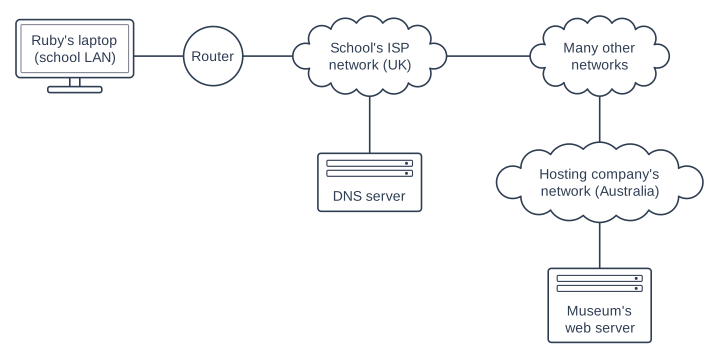
Ruby is at school in Leeds. She wants to look at a page on a museum's website. The website is hosted on a web server in Australia. The diagram shows some of the networks between Ruby's laptop and the web server.

Explain how the Internet and the DNS allow Ruby to view the web page. Refer to the diagram in your answer.

Block diagram with seven parts in three rows. Top row, left to right: a computer (monitor) "Ruby's laptop (school LAN)", a circle "Router", a cloud "School's ISP network (UK)" and a cloud "Many other networks". Middle row, left to right: a server "DNS server" and a cloud "Hosting company's network (Australia)". Bottom row: a server "Museum's web server". Connections: a line joining "Ruby's laptop (school LAN)" and "Router"; a line joining "Router" and "School's ISP network (UK)"; a line joining "School's ISP network (UK)" and "DNS server"; a line joining "School's ISP network (UK)" and "Many other networks"; a line joining "Many other networks" and "Hosting company's network (Australia)"; a line joining "Hosting company's network (Australia)" and "Museum's web server".

Model answer

The Internet is a network of networks: Ruby's laptop is on the school LAN, which is connected by the router to the school's ISP network, and that is connected to many other networks around the world, including the hosting company's network in Australia. First, Ruby's browser sends the website's domain name to a DNS server, which sends back the IP address of the museum's web server; if it does not know it, it passes the request on to other DNS servers. The browser then sends a request for the page to that IP address. Routers forward the request from network to network until it reaches the hosting company's network and the web server. The web server sends the files of the page back across the networks to Ruby's laptop, and her browser displays the page.

Explanation

This question joins up the whole topic: the Internet is many connected networks, DNS turns the domain name into an IP address, and the request then travels through those networks to the web server that hosts the site. The page comes back the same way. Using the names in the diagram (school LAN, ISP network, hosting company's network) shows the examiner you are applying your knowledge.

Mark scheme
  1. 1 mark

    The Internet is a network of networks: the school LAN is connected (by the router) to the school's ISP network, which is connected to many other networks, including the hosting company's network

  2. 1 mark

    Ruby's browser sends the URL/domain name to a DNS server, which sends back the IP address of the museum's web server

  3. 1 mark

    If that DNS server does not have the IP address, it passes the request on to other DNS servers

  4. 1 mark

    The browser sends a request for the web page to the web server's IP address

  5. 1 mark

    Routers forward the request from one network to the next (across the many networks) until it reaches the hosting company's network and the web server

    Do not award MS1 and MS5 for the same statement: MS5 needs the idea of the request/data being forwarded/routed from network to network.

  6. 1 mark

    The web server sends the files of the web page back across the networks to Ruby's laptop (its IP address)

  7. 1 mark

    Ruby's browser displays/renders the web page

    max 5. Accept references to packets and to HTTP/HTTPS, but they are not needed.

Ready to try the rest? Every answer you write is marked against the mark scheme, so you can see exactly where the marks are.

Study Helper Hints first, answers after you try

Stuck on this one? Ask for a hint and I’ll point you in the right direction, without giving the answer away. Once you’ve checked your answer, I’ll show you how the marks are awarded.