
Level:
Correct: 0
Incorrect: 0
Marks: 0/0
Exam Practice
Course:
Topics:
OCR GCSE Computer Science (Paper 1) Smart practice A mixed round aimed at your weak spots
Unit 1
Systems architecture
Unit 2
Memory and storage
Unit 3
Computer networks, connections and protocols
Unit 4
Network security
Unit 5
Systems software
Unit 6
Ethical, legal, cultural and environmental impacts of digital technology
Avg
score:
–
Topics
done:
0/34

Star and mesh network topologies

Practise 25 exam-style questions on Star and mesh network topologies for OCR GCSE Computer Science (Paper 1). Write your answer as you would in the exam and get it marked in seconds against the mark scheme, point by point, with the Study Helper on hand if you get stuck.

  • 25 questions
  • 1–8 marks each
  • Instant marking
  • No sign-up needed
20 questions, marked as you go

Sample questions with model answers

Here are 4 of the questions in this topic, each with a model answer, an explanation of why it earns the marks and the mark scheme an examiner would use.

Question 1

1 mark

Which of these is an advantage of a star topology?

Choose your answer.

  • If the switch fails, the other devices keep working
  • If one cable fails, only that device is affected
  • Data can take several routes between two devices
  • No central device is needed

Model answer

If one cable fails, only that device is affected

Explanation

Each device in a star has its own cable to the central switch, so a cable fault cuts off only one device. If the switch itself fails, every device is affected. Several routes between devices and having no central device are features of a mesh, not a star.

Mark scheme
  1. 1 mark

    If one cable fails, only that device is affected

    If more than one option is given, 0 marks.
Question 2

2 marks

A large warehouse has computers spread far apart around the building. They are all connected in a star topology to one switch in the warehouse office.

Give two disadvantages of using a star topology in the warehouse.

Model answer

Each computer needs its own long cable running all the way back to the switch in the office, which is expensive to install in a large building. Also, if the switch fails, every computer in the warehouse loses its connection.

Explanation

A star's disadvantages are the central switch as a single point of failure, the cabling needed (one cable per device back to the centre, which matters when devices are far apart) and the limited ports on the switch. A broken cable only affects one device, so that is not a disadvantage.

Mark scheme
  1. 1 mark

    Each computer needs its own (long) cable back to the switch, so a lot of cable is needed // it is expensive / disruptive to install

  2. 1 mark

    If the switch fails, the whole network stops // the switch is a single point of failure

  3. 1 mark

    The switch has a limited number of ports, so another switch may be needed to add more computers

    max 2. Do not accept 'if one cable breaks the whole network stops'.

Question 3

3 marks

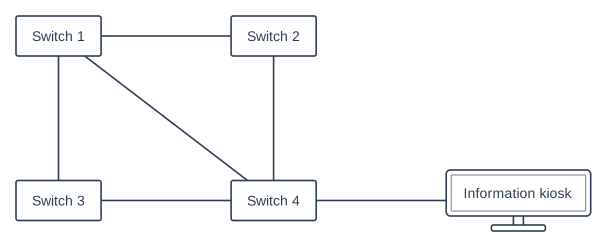
A shopping centre connects the switches in four areas of the centre in a partial mesh, as shown in the diagram. An information kiosk is connected by one cable to Switch 4.

The manager says: "Our mesh network has no single point of failure."

Explain why this is not true for the information kiosk, and suggest how the kiosk's connection could be made more reliable.

Block diagram with five parts in three rows. Top row, left to right: a box "Switch 1" and a box "Switch 2". Bottom row, left to right: a box "Switch 3", a box "Switch 4" and a computer (monitor) "Information kiosk". Connections: a line joining "Switch 1" and "Switch 2"; a line joining "Switch 1" and "Switch 3"; a line joining "Switch 2" and "Switch 4"; a line joining "Switch 3" and "Switch 4"; a line joining "Switch 1" and "Switch 4"; a line joining "Switch 4" and "Information kiosk".

Model answer

The kiosk is connected only to Switch 4, by one cable, so there is only one route to it. If that cable or Switch 4 fails, the kiosk is cut off, so for the kiosk the cable and Switch 4 are single points of failure. Connecting the kiosk to a second switch, such as Switch 2, with another cable would give it a second route.

Explanation

A mesh only protects devices that have more than one connection. The four switches each have at least two links, so any one cable between them can fail without cutting a switch off, but the kiosk depends on one cable and one switch. Making a connection more reliable means adding a second route, not just replacing the same single link.

Mark scheme
  1. 1 mark

    The kiosk has only one cable/connection (one route), so if that cable fails the kiosk is cut off from the network // the cable is a single point of failure for the kiosk

  2. 1 mark

    If Switch 4 fails, the kiosk is also cut off (even though the other switches can still reach each other) // Switch 4 is a single point of failure for the kiosk

  3. 1 mark

    Connect the kiosk to a second switch (e.g. Switch 1, 2 or 3) with another cable // give it a second (e.g. wireless) connection to a different part of the network

    Do not accept 'replace the cable' or 'buy a better switch' - the kiosk would still have only one route.

Question 4

4 marks

The Patel family live in a large, old house with thick stone walls. Their wireless router is in the kitchen, and the Wi-Fi does not reach the bedrooms or the garden office. They buy a mesh Wi-Fi system: one node connects to the router and two more nodes are placed around the house. The nodes connect to each other wirelessly.

Explain why a mesh Wi-Fi system is suitable for the Patel family's home.

Model answer

The nodes can be placed around the house, so the Wi-Fi reaches the bedrooms and the garden office, and each device connects to whichever node is nearest, giving a strong signal. Each node can connect to more than one other node, so if one wireless link is blocked by a thick stone wall, the data can travel by a different route through another node. The nodes connect wirelessly, so no cables have to be drilled through the thick walls, and another node can be added later if a room still has a weak signal.

Explanation

Mesh Wi-Fi is a wireless mesh: the nodes pass data between each other, and data can take whichever route works best. It suits a large house with thick walls because the nodes spread coverage, routes can avoid blocked paths, and no new cabling is needed. Apply each point to the house to reach full marks.

Mark scheme
  1. 1 mark

    The nodes are spread around the house, so the Wi-Fi reaches every room / the garden office // devices connect to the nearest node, so they get a strong signal

  2. 1 mark

    Each node can connect to more than one other node, so data can take more than one route to the router

  3. 1 mark

    If one wireless link is weak/blocked (e.g. by a thick wall) or a node away from the router fails, data can be sent by a different route through another node

    Do not award MS2 and MS3 for the same statement unless both the several connections and the rerouting are described.

  4. 1 mark

    The nodes connect wirelessly, so no new cables need to be run through the thick stone walls

  5. 1 mark

    It is easy to extend: another node can be added if a room still has a weak signal

    max 4. For 4 marks the answer must be applied to the house (thick walls, bedrooms, garden office). Do not accept 'faster Internet' on its own.

Ready to try the rest? Every answer you write is marked against the mark scheme, so you can see exactly where the marks are.

Study Helper Hints first, answers after you try

Stuck on this one? Ask for a hint and I’ll point you in the right direction, without giving the answer away. Once you’ve checked your answer, I’ll show you how the marks are awarded.