Practise 29 exam-style questions on Images: pixels, colour depth and resolution for OCR GCSE Computer Science (Paper 1). Write your answer as you would in the exam and get it marked in seconds against the mark scheme, point by point, with the Study Helper on hand if you get stuck.
29 questions
1–6 marks each
Instant marking
No sign-up needed
20 questions, marked as you go
Sample questions with model answers
Here are 4 of the questions in this topic, each with a model answer, an explanation of why it earns the marks and the mark scheme an examiner would use.
Question 1
1 mark
A designer's logo uses 100 different colours.
What is the minimum colour depth needed to store the logo?
Choose your answer.
6 bits
7 bits
8 bits
100 bits
Model answer
7 bits
Explanation
Find the smallest colour depth n where 2ⁿ is at least 100. 2⁶ = 64 is too few and 2⁷ = 128 is enough, so 7 bits are needed. 8 bits would also store the logo but uses more bits than necessary.
Mark scheme
1 mark
7 bits
6 bits give only 64 colours; 7 bits give 128. 8 bits would work but is not the minimum. More than one answer given = 0 marks
Question 2
2 marks
A shop's receipt printer prints the shop's logo using a colour depth of 1 bit.
Explain why the logo can contain only two colours.
Model answer
With a colour depth of 1 bit, each pixel is stored as a single bit, which can only be 0 or 1. Each colour needs its own code, so there are only two codes and only two colours - for example 0 for white and 1 for black.
Explanation
The number of colours is 2 to the power of the colour depth, and 2¹ = 2. Each colour needs a unique code, so with two codes only two colours are possible. A third colour would need at least 2 bits per pixel.
Mark scheme
1 mark
1 bit can only be 0 or 1 // there are only two possible codes
1 mark
each colour needs its own (unique) code, so only two colours (e.g. black and white) can be represented
Question 3
3 marks
Marcus has a photo with a resolution of 400 × 300 pixels. When he prints it as a large poster, the photo looks blocky (pixelated).
Explain why.
Model answer
The photo has a low resolution: it has only 400 × 300 = 120,000 pixels. When it is printed as a large poster, those same pixels are spread over a much bigger area, so each pixel is printed as a large square. The individual pixels become visible and edges look jagged, so the photo looks blocky.
Explanation
Enlarging an image does not add pixels - it makes each existing pixel bigger. With few pixels, the squares become big enough to see. A higher-resolution image has more, smaller pixels for the same print size, so it keeps more detail.
Mark scheme
1 mark
the photo has a low resolution // it has few pixels (only 120,000)
1 mark
when it is enlarged, each pixel is printed much larger // the same number of pixels is spread over a bigger area
1 mark
so the individual pixels become visible as squares // fine detail is lost / edges look jagged
1 mark
a higher-resolution photo would have more pixels and so more detail at that size
max 3
Question 4
4 marks
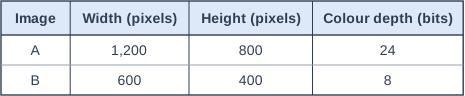
The table shows details of two images, A and B, stored on a school's website.
Compare images A and B in terms of their quality and their file sizes. Use the data in the table in your answer.
Model answer
Image A has 1,200 × 800 = 960,000 pixels, four times as many as B's 600 × 400 = 240,000, so A shows more detail. A also has a colour depth of 24 bits compared with 8, so it can show over 16 million colours rather than 256, giving more realistic colours. So A is the higher-quality image. However, A's file is much larger: 1,200 × 800 × 24 = 23,040,000 bits (2.88 MB) compared with 600 × 400 × 8 = 1,920,000 bits (0.24 MB) for B. A is 12 times the size of B, because it has 4 times the pixels and 3 times the bits per pixel.
Explanation
Resolution and colour depth both improve quality and both increase file size, and their effects multiply: 4 times the pixels × 3 times the bits per pixel = 12 times the file size. A comparison should say how A and B differ, using the numbers from the table, rather than describing each image separately.
Mark scheme
1 mark
A has a higher resolution / more pixels (960,000 compared with 240,000 // four times as many)
accept 'A is twice as wide and twice as high'
1 mark
A has a greater colour depth (24 bits compared with 8), so it can show more colours (over 16 million compared with 256)
1 mark
so A is higher quality // A shows more detail and more realistic colours
1 mark
A has the larger file size, e.g. A = 1,200 × 800 × 24 = 23,040,000 bits (2.88 MB) and B = 600 × 400 × 8 = 1,920,000 bits (240,000 bytes / 0.24 MB)
accept 2.75 MB and 234 KB using 1,024. 'A is bigger' needs a reason (more pixels / more bits per pixel) or figures
1 mark
A's file is 12 times the size of B's (4 times the pixels × 3 times the bits per pixel)
max 4. For 4 marks, both quality and file size must be compared
Ready to try the rest? Every answer you write is marked against the mark scheme, so you can see exactly where the marks are.
Ctrl + Enter to check
Study HelperHints first, answers after you try
Stuck on this one? Ask for a hint and I’ll point you in the right direction, without giving the answer away. Once you’ve checked your answer, I’ll show you how the marks are awarded.