
Level:
Correct: 0
Incorrect: 0
Marks: 0/0
Exam Practice
Course:
Topics:
OCR GCSE Computer Science (Paper 1) Smart practice A mixed round aimed at your weak spots
Unit 1
Systems architecture
Unit 2
Memory and storage
Unit 3
Computer networks, connections and protocols
Unit 4
Network security
Unit 5
Systems software
Unit 6
Ethical, legal, cultural and environmental impacts of digital technology
Avg
score:
–
Topics
done:
0/34

Data capacity and file size calculations

Practise 34 exam-style questions on Data capacity and file size calculations for OCR GCSE Computer Science (Paper 1). Write your answer as you would in the exam and get it marked in seconds against the mark scheme, point by point, with the Study Helper on hand if you get stuck.

  • 34 questions
  • 1–6 marks each
  • Instant marking
  • No sign-up needed
20 questions, marked as you go

Sample questions with model answers

Here are 4 of the questions in this topic, each with a model answer, an explanation of why it earns the marks and the mark scheme an examiner would use.

Question 1

2 marks

Callum writes a blog post that contains 6,000 characters. Each character is stored using 8 bits.

Calculate the size of the text file in kilobytes (KB). Show your working.

Model answer

Size = bits per character × number of characters
= 8 × 6,000 = 48,000 bits
48,000 ÷ 8 = 6,000 bytes
6,000 ÷ 1,000 = 6 KB

Explanation

Use the text file formula: bits per character × number of characters gives 48,000 bits. Divide by 8 to get bytes (6,000 bytes) and by 1,000 to get kilobytes (6 KB); dividing by 1,024 instead gives 5.86 KB, which is also accepted. Because each character here is 8 bits (1 byte), the number of bytes equals the number of characters, which is a useful check.

Mark scheme
  1. 1 mark

    Working: 8 × 6,000 (= 48,000 bits) // 48,000 ÷ 8 (= 6,000 bytes) // 6,000 bytes ÷ 1,000 (or ÷ 1,024)

    Award for any correct stage of the method. Ignore missing unit labels in the working.

  2. 1 mark

    6 KB // 5.86 KB (using 1,024)

    Accept 5.86 / 5.9 / 5.859 KB (6,000 ÷ 1,024). Allow an answer with a stated metadata allowance, e.g. 6.6 KB with 10% added. 48 KB (bits not divided by 8) does not get this mark. Correct answer with no working scores full marks.
Question 2

3 marks

A games company creates a background image 400 pixels wide and 300 pixels high. The image can use up to 256 different colours, and it is stored using the smallest colour depth possible.

Calculate the file size of the image in kilobytes (KB). Show your working.

Model answer

256 colours = 2⁸, so the colour depth is 8 bits.
Size = 8 × 300 × 400 = 960,000 bits
960,000 ÷ 8 = 120,000 bytes
120,000 ÷ 1,000 = 120 KB

Explanation

First find the colour depth: n bits give 2ⁿ colours, and 2⁸ = 256, so 8 bits per pixel are needed. Then use colour depth × height × width = 8 × 300 × 400 = 960,000 bits, which is 120,000 bytes or 120 KB (117.19 KB with 1,024). The usual mistake is to multiply by 256 (the number of colours) instead of 8 (the number of bits).

Mark scheme
  1. 1 mark

    Colour depth = 8 bits (because 2⁸ = 256)

    Using 256 as the colour depth does not get this mark.

  2. 1 mark

    8 × 400 × 300 (= 960,000 bits) // 120,000 pixels × 1 byte (= 120,000 bytes)

    Allow ecf: a correct method using their colour depth, e.g. 256 × 400 × 300.

  3. 1 mark

    120 KB // 117.19 KB (using 1,024)

    Accept 117.2 / 117.19 KB (120,000 ÷ 1,024). Allow an answer with a stated metadata allowance, e.g. 132 KB with 10% added. Not awarded for an answer based on a colour depth of 256 bits. Correct answer with no working scores full marks.

Question 3

3 marks

A digital artist saves an image 500 pixels wide and 400 pixels high with a colour depth of 8 bits. The file also contains 2,000 bytes of metadata, such as the width, height and date created.

Calculate the total size of the file in kilobytes (KB). Show your working.

Model answer

Image data = 8 × 400 × 500 = 1,600,000 bits
1,600,000 ÷ 8 = 200,000 bytes
Total = 200,000 + 2,000 = 202,000 bytes
202,000 ÷ 1,000 = 202 KB

Explanation

The formula colour depth × height × width only gives the size of the pixel data: 1,600,000 bits = 200,000 bytes. The metadata is extra data stored in the same file, so it must be added - but only once both values are in the same unit (bytes here). The total is 202,000 bytes = 202 KB (197.27 KB with 1,024).

Mark scheme
  1. 1 mark

    8 × 500 × 400 (= 1,600,000 bits) // 200,000 bytes

    Award for any correct method for the image data.

  2. 1 mark

    Adds the metadata in the same unit: 200,000 + 2,000 (= 202,000 bytes) // 200 KB + 2 KB

    Not awarded if 2,000 is added to the number of bits (1,602,000).

  3. 1 mark

    202 KB // 197.27 KB (using 1,024)

    Accept 197.3 / 197.27 KB (202,000 ÷ 1,024). 200 KB (metadata left out) does not get this mark. Correct answer with no working scores full marks.

Question 4

4 marks

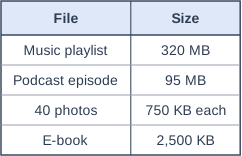
Zainab's smartwatch has 512 MB of free storage. She wants to copy all of the files in the table onto it.

Calculate the total size of the files in megabytes (MB) and how much free storage would be left afterwards. Show your working.

Table with columns "File", "Size". File: Music playlist; Size: 320 MB | File: Podcast episode; Size: 95 MB | File: 40 photos; Size: 750 KB each | File: E-book; Size: 2,500 KB.

Model answer

Photos: 40 × 750 KB = 30,000 KB = 30 MB
E-book: 2,500 KB = 2.5 MB
Total = 320 + 95 + 30 + 2.5 = 447.5 MB
Free storage left = 512 - 447.5 = 64.5 MB

Explanation

Before adding sizes together they must all be in the same unit, so convert the KB values to MB by dividing by 1,000 (or 1,024). Remember there are 40 photos, not one. The files need 447.5 MB, which is less than the smartwatch's 512 MB, leaving 64.5 MB (65.26 MB with 1,024).

Mark scheme
  1. 1 mark

    Photos: 40 × 750 = 30,000 KB = 30 MB

    Allow 29.3 MB using 1,024.

  2. 1 mark

    E-book: 2,500 KB = 2.5 MB

    Allow 2.44 MB using 1,024.

  3. 1 mark

    Total = 320 + 95 + 30 + 2.5 = 447.5 MB

    Allow 446.74 MB (accept 446.7) using 1,024. Allow ecf from their photo and e-book sizes, but all four files must be in MB.

  4. 1 mark

    512 - 447.5 = 64.5 MB left

    Using 1,024: 512 - 446.74 = 65.26 MB (accept 65.3). Allow a stated metadata allowance, e.g. 10% added: total 492.25 MB, 19.75 MB left. Allow ecf from their total. Correct answer with no working scores full marks.

Ready to try the rest? Every answer you write is marked against the mark scheme, so you can see exactly where the marks are.

Study Helper Hints first, answers after you try

Stuck on this one? Ask for a hint and I’ll point you in the right direction, without giving the answer away. Once you’ve checked your answer, I’ll show you how the marks are awarded.