Practise 34 exam-style questions on Primary storage (memory) for OCR GCSE Computer Science (Paper 1). Write your answer as you would in the exam and get it marked in seconds against the mark scheme, point by point, with the Study Helper on hand if you get stuck.
34 questions
1–8 marks each
Instant marking
No sign-up needed
20 questions, marked as you go
Sample questions with model answers
Here are 4 of the questions in this topic, each with a model answer, an explanation of why it earns the marks and the mark scheme an examiner would use.
Question 1
1 mark
A CPU has cache memory.
What does cache memory store?
Choose your answer.
Frequently used data and instructions
The boot-up instructions
Files that the user has saved
Data moved out of RAM when RAM is full
Model answer
Frequently used data and instructions
Explanation
Cache is a small amount of very fast memory in or near the CPU. It holds copies of data and instructions that are used often (or were used recently), so the CPU can get them faster than from RAM. The boot-up instructions are stored in ROM, saved files are kept on secondary storage, and data moved out of RAM when RAM is full goes to virtual memory - a common confusion with cache.
Mark scheme
1 mark
Frequently used data and instructions
Do not award if more than one option is given.
Question 2
2 marks
Give one advantage and one disadvantage of a computer using virtual memory.
Model answer
Advantage: programs can still be opened and run when RAM is full. Disadvantage: the computer runs more slowly, because secondary storage is much slower to access than RAM.
Explanation
Virtual memory lets a computer carry on when RAM is full, by using part of secondary storage as extra memory. The cost is speed: data has to be moved between RAM and secondary storage, which is much slower to access than RAM. A common mistake is to say virtual memory makes a computer faster - it only stops it failing when RAM runs out.
Mark scheme
1 mark
Advantage: more programs/data can be open/used than would fit in RAM alone // programs can still be opened/run when RAM is full // stops the computer crashing or refusing to open programs when RAM is full // avoids having to buy more RAM
1 mark
Disadvantage: the computer/programs run more slowly (when it is used) // secondary storage is slower to access than RAM // time is wasted moving data between RAM and secondary storage // risk of disk thrashing // uses up some secondary storage space
'Slow' on its own is NE - must say what is slower or why. Do not award an advantage given as the disadvantage or vice versa.
Question 3
3 marks
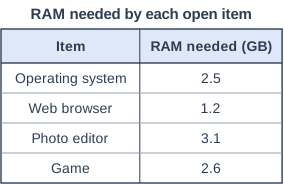
A computer has 8 GB of RAM. The table shows how much RAM is needed by each item that is open on the computer.
Calculate how much data will have to be stored in virtual memory. Give your answer in megabytes (MB).
Show your working.
Model answer
Total RAM needed = 2.5 + 1.2 + 3.1 + 2.6 = 9.4 GB Amount that does not fit = 9.4 − 8 = 1.4 GB In MB: 1.4 × 1,000 = 1,400 MB Answer: 1,400 MB (or 1,433.6 MB using 1,024 MB per GB)
Explanation
Add up the RAM needed by everything that is open, then subtract the RAM available: the amount left over cannot fit in RAM, so it has to go into virtual memory. Finally convert gigabytes to megabytes by multiplying by 1,000 (multiplying by 1,024 is also accepted). A common mistake is to stop at 1.4 and forget to convert to MB.
Accept 1,400 (using 1 GB = 1,000 MB) or 1,433.6 (using 1 GB = 1,024 MB), and accept 1,433 or 1,434. Allow follow-through from their difference in GB × 1,000 or × 1,024. Do not accept 1.4 GB for this mark (the answer must be in MB).
Question 4
5 marks
Jamal switches on his games console and then starts a game that is stored on the console's solid state drive (SSD).
Describe how ROM, RAM and cache are each used from the moment the console is switched on until the game is running.
Model answer
When Jamal switches the console on, RAM is empty, so the CPU runs the boot-up instructions stored in ROM. These load the console's operating system from the SSD into RAM. When he starts the game, the game's program and data are copied from the SSD into RAM, because the CPU can only run instructions held in main memory. While the game runs, RAM also holds changing data such as his score and position. Instructions and data that the CPU uses frequently are copied into cache, which the CPU checks first because it is faster to access than RAM.
Explanation
This question tests how the three types of primary storage work together. ROM provides the boot-up instructions, RAM holds the operating system and the game while they run, and cache keeps the most frequently used instructions and data close to the CPU. Note that the game itself is stored on secondary storage (the SSD) and must be copied into RAM; it is never run from ROM or straight from the SSD.
Mark scheme
1 mark
When the console is switched on, the CPU runs the boot-up/start-up instructions/BIOS/firmware stored in ROM
1 mark each to max 5. Max 4 if one of ROM, RAM or cache is not described.
1 mark
These instructions load the operating system from the SSD into RAM
1 mark
When Jamal starts the game, the game (program and data) is copied/loaded from the SSD into RAM
1 mark
The CPU fetches the game's instructions and data from RAM (to execute them)
1 mark
RAM holds data that changes as the game is played (e.g. scores, player positions)
1 mark
Frequently/recently used instructions/data are copied into cache
1 mark
So the CPU can access them faster than from RAM // the CPU checks cache before RAM
Ready to try the rest? Every answer you write is marked against the mark scheme, so you can see exactly where the marks are.
Ctrl + Enter to check
Study HelperHints first, answers after you try
Stuck on this one? Ask for a hint and I’ll point you in the right direction, without giving the answer away. Once you’ve checked your answer, I’ll show you how the marks are awarded.