Operating systems: user interface and memory management
Practise 27 exam-style questions on Operating systems: user interface and memory management for OCR GCSE Computer Science (Paper 1). Write your answer as you would in the exam and get it marked in seconds against the mark scheme, point by point, with the Study Helper on hand if you get stuck.
27 questions
1–8 marks each
Instant marking
No sign-up needed
20 questions, marked as you go
Sample questions with model answers
Here are 4 of the questions in this topic, each with a model answer, an explanation of why it earns the marks and the mark scheme an examiner would use.
Question 1
1 mark
Which type of user interface would be most suitable for a person who cannot use their hands to control a computer?
Choose your answer.
Command-line interface
Voice interface
Menu-driven interface on a touchscreen
GUI controlled with a mouse
Model answer
Voice interface
Explanation
A voice interface lets the user control the computer by speaking commands, so no hands are needed. A command-line interface needs typing, a touchscreen menu needs the screen to be touched, and a GUI controlled with a mouse needs the mouse to be moved and clicked. Choosing an interface always starts with the needs of the user.
Mark scheme
1 mark
Voice interface
If more than one option is given, 0 marks. Accept speech recognition / voice control.
Question 2
3 marks
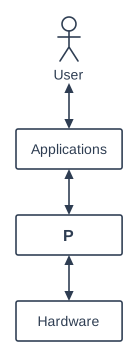
The diagram shows the layers of a computer system. One layer is labelled P.
Identify layer P and describe how it allows the applications to use the hardware.
Model answer
P is the operating system. Applications do not control the hardware themselves. Instead they send requests to the operating system, for example to save a file or print a page. The operating system then controls the hardware to carry out the request and passes any results back to the application, so programmers do not need to know how each device works.
Explanation
The operating system is the layer between the applications and the hardware. Applications ask the OS to do things, and the OS controls the hardware (using device drivers) to do them. This means an application can work on computers with different hardware without being rewritten.
Mark scheme
1 mark
P: (the) operating system // OS
Accept a named operating system, e.g. Windows / macOS / Linux / Android / iOS. Do not accept 'system software' or 'firmware'.
1 mark
Applications send requests to the operating system (e.g. to save a file, print, read input or get memory) instead of controlling the hardware directly
1 mark
The operating system controls the hardware on the applications' behalf // passes the instructions to the hardware (using device drivers) and returns data/results to the application
1 mark
So application programmers do not need to know how each hardware device works // the same application can run on computers with different hardware
max 3. If P is identified as something other than the operating system, max 2.
Question 3
3 marks
A primary school is buying tablet computers for its Year 1 classes. The pupils are five and six years old. The tablets have a touchscreen graphical user interface.
Explain why this type of user interface is suitable for the pupils.
Model answer
A touchscreen GUI uses icons and pictures, so pupils who cannot read well yet can still recognise and open the right apps. They do not have to learn or type any commands, so it is easy to learn. They can simply tap and drag on the screen, which is much easier for five-year-olds than controlling a mouse or using a keyboard.
Explanation
When choosing an interface, think about the users: young children cannot read or type well and may find a mouse difficult. Icons, direct touch and simple layouts suit them. 'Easy to use' does not earn a mark by itself - you need to say what makes it easy for these users.
Mark scheme
1 mark
Uses icons/pictures, so pupils who cannot yet read well can recognise and find the apps
1 mark
Intuitive/easy to learn because there are no commands to learn, remember or type
1 mark
Pupils touch/tap/drag directly on the screen, which is easier for young children than using a mouse or keyboard
1 mark
The tablets can be set up with large icons / only a few apps or options, so pupils are not confused
1 mark
Gives instant visual feedback (e.g. icons highlight or animate when tapped), so pupils can see what they have done
max 3. Each point must say why it suits young pupils; 'easy to use' or 'user-friendly' on its own is not enough.
Question 4
4 marks
Compare a graphical user interface (GUI) with a command-line interface.
Model answer
A GUI is easier for beginners because they can click icons and menus, whereas a command-line interface needs the user to learn and remember commands. A GUI uses more memory and processing power than a command-line interface. For experts, a command-line interface can be faster, because one command can do what would take many clicks in a GUI, and commands can be put into scripts to automate repetitive tasks.
Explanation
A 'compare' answer needs points that say how the two interfaces differ, not separate facts about each. The key differences are ease of learning, use of resources, speed for experts, automation and control. A GUI suits most everyday users; a command-line interface suits technicians and experts.
Mark scheme
1 mark
A GUI is easier for beginners to learn / more intuitive // a command-line interface needs commands to be learnt and remembered
1 mark
A GUI uses more memory/processing power/storage // a command-line interface uses fewer resources
1 mark
A command-line interface can be faster for expert users // a GUI may need many clicks through menus and windows
1 mark
Commands can be combined/written into scripts to automate repetitive tasks // this is harder in a GUI
1 mark
A command-line interface gives more control / access to more (advanced) settings and features
1 mark
A GUI shows information visually (icons, previews, several windows at once) // a command-line interface shows only text
1 mark
In a command-line interface a typing mistake can make a command fail or do the wrong thing // in a GUI the user chooses from options, so fewer errors
max 4. Each point must compare the two interfaces: a statement about one interface scores only if the comparison is clear (e.g. 'a CLI uses less memory'). Do not award MS1 and MS6 for the same statement, e.g. 'a GUI is easier because it uses icons' scores MS1 only.
Ready to try the rest? Every answer you write is marked against the mark scheme, so you can see exactly where the marks are.
Ctrl + Enter to check
Study HelperHints first, answers after you try
Stuck on this one? Ask for a hint and I’ll point you in the right direction, without giving the answer away. Once you’ve checked your answer, I’ll show you how the marks are awarded.