
Level:
Correct: 0
Incorrect: 0
Marks: 0/0
Exam Practice
Course:
Topics:
OCR GCSE Computer Science (Paper 1) Smart practice A mixed round aimed at your weak spots
Unit 1
Systems architecture
Unit 2
Memory and storage
Unit 3
Computer networks, connections and protocols
Unit 4
Network security
Unit 5
Systems software
Unit 6
Ethical, legal, cultural and environmental impacts of digital technology
Avg
score:
–
Topics
done:
0/34

Hardware needed to connect computers into a LAN

Practise 29 exam-style questions on Hardware needed to connect computers into a LAN for OCR GCSE Computer Science (Paper 1). Write your answer as you would in the exam and get it marked in seconds against the mark scheme, point by point, with the Study Helper on hand if you get stuck.

  • 29 questions
  • 1–6 marks each
  • Instant marking
  • No sign-up needed
20 questions, marked as you go

Sample questions with model answers

Here are 4 of the questions in this topic, each with a model answer, an explanation of why it earns the marks and the mark scheme an examiner would use.

Question 1

1 mark

A computer on an office LAN sends a file to another computer on the same LAN. The data passes through a switch.

Which address does the switch use to send the data only to the correct computer?

Choose your answer.

  • IP address
  • MAC address
  • URL
  • Email address

Model answer

MAC address

Explanation

A switch reads the destination MAC address in the data and sends it only to the device with that MAC address. Routers use IP addresses to send packets between different networks, which is why 'IP address' is the most common wrong answer. A URL is a web address, which DNS converts into an IP address.

Mark scheme
  1. 1 mark

    MAC address

    If more than one option is given, 0 marks.
Question 2

2 marks

Five friends bring their laptops to Fergus's house to play a multiplayer game against each other. The game does not need the Internet. They connect each laptop to a switch using an Ethernet cable.

Explain why they do not need a router.

Model answer

A router is needed only to connect different networks together, such as a LAN and the Internet. All five laptops are on one LAN, so the switch can send the game data directly between them using their MAC addresses, and no data needs to leave the network.

Explanation

A switch and cables (with a NIC in each laptop) are all that is needed to connect computers into a LAN. A router is only needed when data must travel to another network. Many people think a router is always needed because home networks have one, but the home 'router' is also acting as a switch and wireless access point.

Mark scheme
  1. 1 mark

    A router is only needed to connect different networks together // to connect a LAN to the Internet/another network

    'They don't need the Internet' on its own is not enough - must link the router's task to connecting networks/the Internet.

  2. 1 mark

    All the laptops are on the same LAN, so the switch can send the data directly between them (using MAC addresses) // no data needs to leave the LAN

Question 3

3 marks

A factory is installing a network cable from its office switch to a computer that controls the machines on the production floor, 60 metres away. The cable must run past several large electric motors. The installer recommends fibre-optic cable, even though copper (Ethernet) cable is cheaper and works over 60 metres.

Explain why the installer recommends fibre-optic cable.

Model answer

Large electric motors produce electromagnetic interference, which could disturb the electrical signals in a copper cable and corrupt the data. Fibre-optic cable carries data as pulses of light, not electricity, so it is not affected by interference from the motors. The data reaching the control computer is therefore far less likely to be corrupted or need resending, so the connection is reliable.

Explanation

Interference is a key difference between transmission media: copper carries electrical signals that nearby electrical equipment can disturb, while fibre carries light. Here distance is not the reason, because 60 m is within copper's range, so a good answer focuses on the motors. A reliable connection matters because the computer controls the factory's machines.

Mark scheme
  1. 1 mark

    Fibre-optic cable carries data as (pulses of) light, not electrical signals

  2. 1 mark

    Fibre-optic cable is not affected by (electromagnetic) interference from the motors // the motors could interfere with the electrical signals in a copper cable

  3. 1 mark

    ...so the data is not corrupted / fewer errors occur and less data has to be resent // the connection to the control computer is reliable

    Do not credit longer distance: 60 m is within copper's range, as the question says. Higher bandwidth is true but does not explain the choice here - ignore it.

Question 4

4 marks

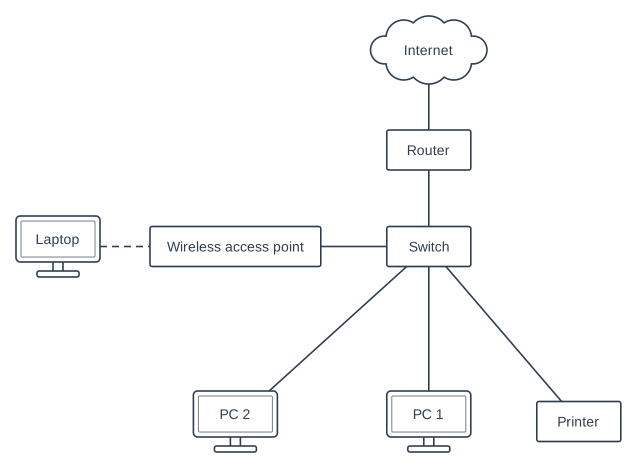
The diagram shows the network in a vet's surgery. The receptionist's laptop is connected by Wi-Fi (the dashed line). All the other connections are cables.

The receptionist prints a letter from the laptop on the printer. Describe how the data travels from the laptop to the printer. Name each piece of hardware the data passes through and describe what it does.

Block diagram with eight parts in five rows. Top row: a cloud "Internet". Second row: a box "Router". Third row, left to right: a computer (monitor) "Laptop", a box "Wireless access point" and a box "Switch". Bottom row, left to right: a computer (monitor) "PC 2", a computer (monitor) "PC 1" and a box "Printer". Connections: a line joining "Internet" and "Router"; a line joining "Router" and "Switch"; a dashed line joining "Laptop" and "Wireless access point"; a line joining "Wireless access point" and "Switch"; a line joining "Switch" and "PC 2"; a line joining "Switch" and "PC 1"; a line joining "Switch" and "Printer".

Model answer

The laptop's wireless NIC converts the letter into radio signals and sends them to the wireless access point. The wireless access point receives the radio signals and sends the data along its cable to the switch, so it joins the laptop to the wired network. The switch reads the printer's MAC address in the data and sends the data out only through the port the printer is connected to. The printer's NIC receives the signals and converts them back into data. The data never goes through the router, because the laptop and the printer are on the same LAN.

Explanation

Follow the data along the diagram: laptop, wireless access point, switch, printer. Each device has a task: the NIC turns data into signals, the WAP links wireless devices to the cabled network, and the switch uses MAC addresses to deliver the data to just one device. A common mistake is to send the data through the router, which is only needed for data going to or from the Internet.

Mark scheme
  1. 1 mark

    The laptop's (wireless) NIC converts the data into radio signals/waves and sends it (to the wireless access point)

  2. 1 mark

    The wireless access point receives the radio signals and passes the data on to the wired network / along the cable to the switch

  3. 1 mark

    The switch reads the destination MAC address (of the printer)

    Do not accept IP address for this point.

  4. 1 mark

    The switch sends the data only to the printer // out of the port the printer is connected to

  5. 1 mark

    The printer's NIC receives the signals from the cable (and converts them back into data)

  6. 1 mark

    The data does not go through the router (or the Internet), because it stays within the LAN

    max 4. For 4 marks the answer must describe both the wireless access point and the switch. If the answer says the data goes via the router or the Internet, do not award MS6 (the other points can still be awarded).

Ready to try the rest? Every answer you write is marked against the mark scheme, so you can see exactly where the marks are.

Study Helper Hints first, answers after you try

Stuck on this one? Ask for a hint and I’ll point you in the right direction, without giving the answer away. Once you’ve checked your answer, I’ll show you how the marks are awarded.