
Level:
Correct: 0
Incorrect: 0
Marks: 0/0
Exam Practice
Subject:
Topics:
Avg
score:
–
Topics
done:
0/32

Validation checks

Practise 33 exam-style questions on Validation checks for Cambridge IGCSE Computer Science (Paper 2). Write your answer as you would in the exam and get it marked in seconds against the mark scheme, point by point, with an AI tutor on hand if you get stuck.

  • 33 questions
  • 1–6 marks each
  • Instant marking
  • No sign-up needed
20 questions, marked as you go

Sample questions with model answers

Here are 4 of the questions in this topic, each with a model answer, an explanation of why it earns the marks and the mark scheme an examiner would use.

Question 1

2 marks

Explain why validation checks are needed when data is input into a computer system.

Model answer

Validation is an automatic check that input data is reasonable and follows set rules, for example that an age is within a sensible range. It stops invalid data from being processed or stored, where it could cause errors or wrong results, and lets the program reject the data and ask for it again.

Explanation

Validation is carried out by the program itself as the data is entered. It can only check that data is sensible, not that it is actually correct, but it catches many mistakes before they cause problems later.

Mark scheme
  1. 1 mark

    To check that the data is reasonable / sensible / follows set rules before it is accepted

    max 2

  2. 1 mark

    To stop invalid data being processed or stored, which could cause errors / crashes / incorrect results

  3. 1 mark

    So that invalid data can be rejected and the user asked to enter it again
Question 2

2 marks

Explain why a REPEAT ... UNTIL loop is often used for a validation routine.

Model answer

The condition is tested at the end of a REPEAT ... UNTIL loop, so the input inside it always happens at least once. The loop then keeps asking for the data again until it passes the validation condition, so invalid data can never get past the loop.

Explanation

With a WHILE loop the data would have to be input once before the loop and again inside it. The post-condition loop needs the input written only once, which is why it is the standard structure for validation.

Mark scheme
  1. 1 mark

    The loop body always runs at least once, so the data is always input at least once

  2. 1 mark

    It repeats the input until the data is valid / until the condition is met, so invalid data is rejected and re-entered

Question 3

3 marks

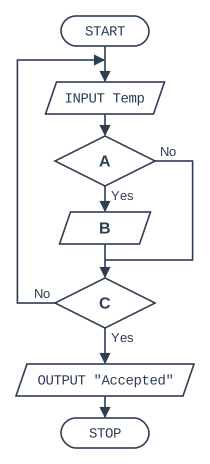
The flowchart shows a validation routine for a temperature that must be between -10 and 40 inclusive.

State what should be written in boxes A, B and C.

Flowchart, read from the top. START, then the input/output box "INPUT Temp", then decision box A (if Yes, input/output box B; if No, nothing is done; the two paths then join), then decision box C (if No, the flow line goes back up to the input/output box "INPUT Temp"; if Yes, the loop ends). After the loop: the input/output box 'OUTPUT "Accepted"', then STOP.

Model answer

A: Temp < -10 OR Temp > 40?
B: OUTPUT "Out of range"
C: Temp ≥ -10 AND Temp ≤ 40?

Explanation

Inside the loop, the decision detects an invalid temperature (too low OR too high) so that an error message can be output. The loop's exit test is the opposite: the routine finishes only when the temperature is within both limits.

Mark scheme
  1. 1 mark

    A: Temp < -10 OR Temp > 40?

  2. 1 mark

    B: OUTPUT a suitable error message, e.g. OUTPUT "Out of range"

  3. 1 mark

    C: Temp ≥ -10 AND Temp ≤ 40?

    Accept: NOT (Temp < -10 OR Temp > 40)?

Question 4

5 marks

A username must not be left blank and must be from 6 to 12 characters long.

Write pseudocode that inputs a username and validates it with a presence check and a length check. A different error message must be output for each check, and the username must be re-entered until it is valid. Output "Username accepted" when a valid username has been entered.

Model answer

REPEAT
    INPUT Username
    Valid ← TRUE
    IF Username = ""
      THEN
        OUTPUT "Username must not be blank"
        Valid ← FALSE
      ELSE
        IF LENGTH(Username) < 6 OR LENGTH(Username) > 12
          THEN
            OUTPUT "Username must be 6 to 12 characters"
            Valid ← FALSE
        ENDIF
    ENDIF
UNTIL Valid
OUTPUT "Username accepted"

Explanation

A flag records whether any check has failed, which keeps the UNTIL condition simple. The length check is in the ELSE so that a blank username gets only the presence message. A blank username would also fail the length check, which is why the presence check is tested first.

Mark scheme
  1. 1 mark

    MP1 loop that repeats until the username is valid, with the INPUT inside it

    max 5

  2. 1 mark

    MP2 presence check: Username = ""

  3. 1 mark

    MP3 suitable error message when the username is blank

  4. 1 mark

    MP4 length check: LENGTH(Username) < 6 OR LENGTH(Username) > 12

  5. 1 mark

    MP5 different suitable error message when the length is wrong

  6. 1 mark

    MP6 loop ends only when both checks are passed

  7. 1 mark

    MP7 outputs "Username accepted" after the loop

Ready to try the rest? Every answer you write is marked against the mark scheme, so you can see exactly where the marks are.

AI Tutor Hints first, answers after you try

Hi! Stuck? Ask me for a hint and I’ll help you work it out. Once you’ve checked your answer I can explain exactly where the marks are.