Practise 31 exam-style questions on File handling for Cambridge IGCSE Computer Science (Paper 2). Write your answer as you would in the exam and get it marked in seconds against the mark scheme, point by point, with an AI tutor on hand if you get stuck.
31 questions
1–6 marks each
Instant marking
No sign-up needed
20 questions, marked as you go
Sample questions with model answers
Here are 4 of the questions in this topic, each with a model answer, an explanation of why it earns the marks and the mark scheme an examiner would use.
Question 1
1 mark
A program has to create a new text file called Report.txt and store data in it.
State the file mode that must be used when the file is opened.
Model answer
WRITE, for example: OPENFILE "Report.txt" FOR WRITE
Explanation
Opening a file FOR WRITE creates the file if it does not already exist, ready for WRITEFILE statements. If the file does exist, its old contents are replaced.
Mark scheme
1 mark
WRITE
Accept OPENFILE "Report.txt" FOR WRITE. Do not accept READ.
Question 2
3 marks
The variable Message holds a line of text.
Write pseudocode statements to open the text file Log.txt for writing, write the contents of Message to the file and then close the file.
Model answer
OPENFILE "Log.txt" FOR WRITE
WRITEFILE "Log.txt", Message
CLOSEFILE "Log.txt"
Explanation
Every file operation follows the same pattern: open the file in the right mode, use it, then close it. WRITEFILE needs the file name and then the data to write, here the value held in Message.
Mark scheme
1 mark
MP1 OPENFILE "Log.txt" FOR WRITE
Accept the file name without quotation marks throughout.
1 mark
MP2 WRITEFILE "Log.txt", Message
Must write the variable Message, not the text "Message".
1 mark
MP3 CLOSEFILE "Log.txt" after the WRITEFILE statement
Question 3
4 marks
The one-dimensional array Names[1:10] holds the names of the ten members of a band.
Write pseudocode to store all ten names in the text file Names.txt, one name on each line.
Model answer
DECLARE Index : INTEGER
OPENFILE "Names.txt" FOR WRITE
FOR Index ← 1 TO 10
    WRITEFILE "Names.txt", Names[Index]
NEXT Index
CLOSEFILE "Names.txt"
Explanation
Each WRITEFILE writes one line, so a loop writes the array one element per line. The file is opened once before the loop and closed once after it; opening it FOR WRITE inside the loop would wipe the file each time and leave only the last name.
Mark scheme
1 mark
MP1 open Names.txt FOR WRITE before the loop
Do not award if the file is opened inside the loop (each opening would erase the names already written).
1 mark
MP2 a loop that repeats 10 times, e.g. FOR Index ← 1 TO 10 ... NEXT Index
1 mark
MP3 write Names[Index] to the file inside the loop, using the loop counter as the index
e.g. WRITEFILE "Names.txt", Names[Index]
1 mark
MP4 close the file after the loop
Do not award if CLOSEFILE is inside the loop.
Question 4
5 marks
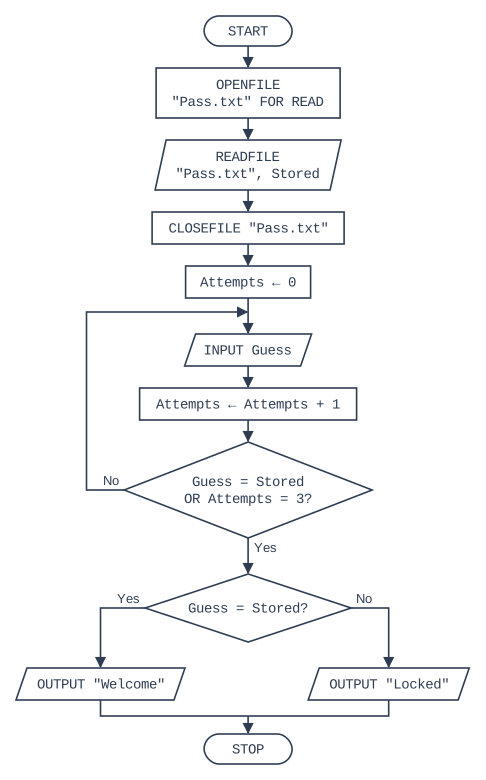
The flowchart shows an algorithm that reads a stored password from the text file Pass.txt and gives the user up to three attempts to enter it.
Write pseudocode for the algorithm shown in the flowchart.
Model answer
OPENFILE "Pass.txt" FOR READ
READFILE "Pass.txt", Stored
CLOSEFILE "Pass.txt"
Attempts ← 0
REPEAT
    INPUT Guess
    Attempts ← Attempts + 1
UNTIL Guess = Stored OR Attempts = 3
IF Guess = Stored
  THEN
    OUTPUT "Welcome"
  ELSE
    OUTPUT "Locked"
ENDIF
Explanation
The decision after the loop body, with a flow line back to INPUT Guess, is a post-condition loop, so it becomes REPEAT ... UNTIL. The loop stops on whichever happens first, a correct guess or a third attempt, so the conditions are joined with OR. The final IF is needed because the loop can end either way.
Mark scheme
1 mark
MP1 OPENFILE "Pass.txt" FOR READ, READFILE "Pass.txt", Stored and CLOSEFILE "Pass.txt", in that order, before the loop
1 mark
MP2 Attempts ← 0 before the loop
1 mark
MP3 REPEAT ... UNTIL loop containing INPUT Guess and Attempts ← Attempts + 1
Accept an equivalent WHILE loop that always runs at least once.
1 mark
MP4 loop ends when Guess = Stored OR Attempts = 3
Do not accept AND.
1 mark
MP5 after the loop: IF Guess = Stored THEN OUTPUT "Welcome" ELSE OUTPUT "Locked" ENDIF
Ready to try the rest? Every answer you write is marked against the mark scheme, so you can see exactly where the marks are.
Ctrl + Enter to check
AI TutorHints first, answers after you try
Hi! Stuck? Ask me for a hint and I’ll help you work it out. Once you’ve checked your answer I can explain exactly where the marks are.