Level:
Correct: 0
Incorrect: 0
Marks: 0/0
Exam Practice
Subject:
Topics:
Avg
score:
–
Topics
done:
0/32

Designing solutions with flowcharts

Practise 32 exam-style questions on Designing solutions with flowcharts for Cambridge IGCSE Computer Science (Paper 2). Write your answer as you would in the exam and get it marked in seconds against the mark scheme, point by point, with an AI tutor on hand if you get stuck.

  • 32 questions
  • 1–6 marks each
  • Instant marking
  • No sign-up needed
20 questions, marked as you go

Sample questions with model answers

Here are 4 of the questions in this topic, each with a model answer, an explanation of why it earns the marks and the mark scheme an examiner would use.

Question 1

1 mark

The flowchart shows an algorithm that converts a temperature in degrees Celsius to degrees Fahrenheit using the formula:
Fahrenheit = Celsius × 1.8 + 32

State what should be written in box A.
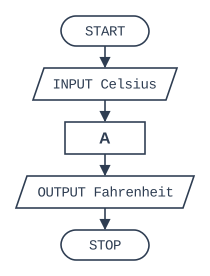
Flowchart, read from the top. START, then the input/output box "INPUT Celsius", then process box A, then the input/output box "OUTPUT Fahrenheit", then STOP.

Model answer

Fahrenheit ← Celsius * 1.8 + 32

Explanation

Box A is a process box, so it holds a calculation whose result is stored in a variable. The variable must be Fahrenheit because that is what the next box outputs.

Mark scheme
  1. 1 mark

    Fahrenheit ← Celsius * 1.8 + 32

    Accept × for *. The result must be assigned to Fahrenheit
Question 2

2 marks

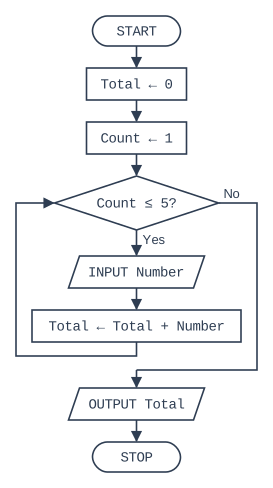
The flowchart shows an algorithm that should input five numbers and output their total. When it is tested, it never stops.

Explain why the algorithm never stops, and state the change needed to the flowchart.

Flowchart, read from the top. START, then the process box "Total ← 0", then the process box "Count ← 1", then the decision box "Count ≤ 5?" (if Yes, the input/output box "INPUT Number", then the process box "Total ← Total + Number", then the flow line goes back up into the decision box "Count ≤ 5?"; if No, the loop ends). After the loop: the input/output box "OUTPUT Total", then STOP.

Model answer

Count starts at 1 and is never increased, so the condition Count ≤ 5 is always true and the loop never ends. A process box Count ← Count + 1 must be added inside the loop, after the box Total ← Total + Number.

Explanation

A pre-condition loop only ends when something inside it changes the condition. Forgetting to update the loop counter is a classic cause of an infinite loop.

Mark scheme
  1. 1 mark

    Count is never changed (never incremented), so Count ≤ 5 is always true / the loop is infinite

  2. 1 mark

    Add a process box Count ← Count + 1 inside the loop (e.g. after Total ← Total + Number, before the flow line goes back to the decision)

    Must be inside the loop

Question 3

3 marks

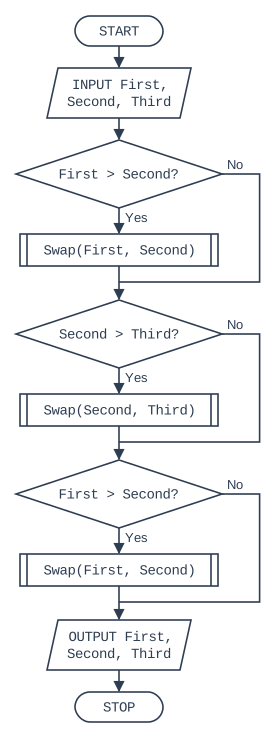
The flowchart shows an algorithm that uses the procedure Swap, which swaps the values stored in its two parameters.

The values input are First = 8, Second = 5 and Third = 2. Give the values of First, Second and Third after each of the three decisions (including any swap).

Flowchart, read from the top. START, then the input/output box "INPUT First, Second, Third", then the decision box "First > Second?" (if Yes, the subroutine box "Swap(First, Second)"; if No, nothing is done; the two paths then join). After the paths join: the decision box "Second > Third?" (if Yes, the subroutine box "Swap(Second, Third)"; if No, nothing is done; the two paths then join). After the paths join: the decision box "First > Second?" (if Yes, the subroutine box "Swap(First, Second)"; if No, nothing is done; the two paths then join). After the paths join: the input/output box "OUTPUT First, Second, Third", then STOP.

Model answer

After decision 1: 5, 8, 2
After decision 2: 5, 2, 8
After decision 3: 2, 5, 8

Explanation

8 > 5, so First and Second are swapped; then 8 > 2, so Second and Third are swapped; then 5 > 2, so First and Second are swapped again. The algorithm sorts three numbers into ascending order, and the subroutine symbol shows that Swap's steps are defined elsewhere.

Mark scheme
  1. 1 mark

    After the first decision: First = 5, Second = 8, Third = 2

  2. 1 mark

    After the second decision: First = 5, Second = 2, Third = 8

  3. 1 mark

    After the third decision: First = 2, Second = 5, Third = 8

Question 4

5 marks

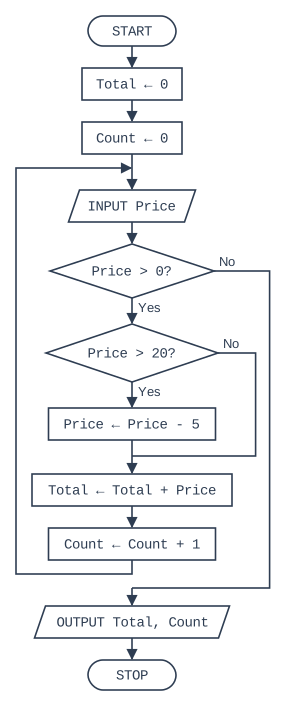
The flowchart shows an algorithm for a shop till. A price of 0 is input to finish.

Write the pseudocode for the algorithm shown in the flowchart.

Flowchart, read from the top. START, then the process box "Total ← 0", then the process box "Count ← 0", then the input/output box "INPUT Price", then the decision box "Price > 0?" (if Yes, the decision box "Price > 20?" (if Yes, the process box "Price ← Price - 5"; if No, nothing is done; the two paths then join), then the process box "Total ← Total + Price", then the process box "Count ← Count + 1", then the flow line goes back up to the input/output box "INPUT Price"; if No, the loop ends). After the loop: the input/output box "OUTPUT Total, Count", then STOP.

Model answer

Total ← 0
Count ← 0
INPUT Price
WHILE Price > 0 DO
    IF Price > 20
      THEN
        Price ← Price - 5
    ENDIF
    Total ← Total + Price
    Count ← Count + 1
    INPUT Price
ENDWHILE
OUTPUT Total, Count

Explanation

The flow line returns to INPUT Price above the decision, so the input happens before every test: in pseudocode that means one INPUT before the WHILE and another at the end of the loop body. Writing a single INPUT inside the loop instead would process the final 0 or test Price before it has a value.

Mark scheme
  1. 1 mark

    MP1 Total ← 0 and Count ← 0 before the loop

    max 5

  2. 1 mark

    MP2 INPUT Price before the loop and again at the end of the loop body

  3. 1 mark

    MP3 WHILE Price > 0 DO ... ENDWHILE (pre-condition loop with the correct condition)

    Accept any equivalent loop that does not process the final 0

  4. 1 mark

    MP4 IF Price > 20 THEN Price ← Price - 5 ENDIF inside the loop

  5. 1 mark

    MP5 Total ← Total + Price and Count ← Count + 1 inside the loop, after the IF

  6. 1 mark

    MP6 OUTPUT Total, Count after the loop

Ready to try the rest? Every answer you write is marked against the mark scheme, so you can see exactly where the marks are.

AI Tutor Hints first, answers after you try

Hi! Stuck? Ask me for a hint and I’ll help you work it out. Once you’ve checked your answer I can explain exactly where the marks are.