
Level:
Correct: 0
Incorrect: 0
Marks: 0/0
Exam Practice
Course:
Topics:
OCR GCSE Computer Science (Paper 2) Smart practice A mixed round aimed at your weak spots
Unit 1
Algorithms
Unit 2
Programming fundamentals
Unit 3
Producing robust programs
Unit 4
Boolean logic
Unit 5
Programming languages and IDEs
Unit 6
Practical programming (Section B)
Avg
score:
–
Topics
done:
0/31

Writing algorithms with pseudocode and flowcharts

Practise 30 exam-style questions on Writing algorithms with pseudocode and flowcharts for OCR GCSE Computer Science (Paper 2). Write your answer as you would in the exam and get it marked in seconds against the mark scheme, point by point, with the Study Helper on hand if you get stuck.

  • 30 questions
  • 1–6 marks each
  • Instant marking
  • No sign-up needed
20 questions, marked as you go

Sample questions with model answers

Here are 4 of the questions in this topic, each with a model answer, an explanation of why it earns the marks and the mark scheme an examiner would use.

Question 1

2 marks

This algorithm should output all the even numbers from 2 to 20, but it does not.

01// output the even numbers from 2 to 20
02for n = 2 to 18 step 2
03    print(n)
04next n

Identify the line that contains the error, and write the corrected line.

Model answer

Line 2 is wrong: the loop ends at 18, so 20 is never output.

Corrected line:
for n = 2 to 20 step 2

Explanation

An ERL for loop includes its end value, and step 2 makes n go up in twos. With an end value of 18, the outputs are 2, 4, ..., 18, so 20 is missing. Changing the end value to 20 gives all ten even numbers. In Python the end value of range is not included, so the equivalent is range(2, 21, 2).

Mark scheme
  1. 1 mark

    Line 2 (the loop stops at 18, so 20 is not output)

  2. 1 mark

    for n = 2 to 20 step 2

    Accept for n = 2 to 21 step 2 (it also stops after 20). Accept an equivalent in a high-level language, e.g. for n in range(2, 21, 2) or range(2, 22, 2). Do not accept range(2, 20, 2) (stops at 18).
Question 2

3 marks

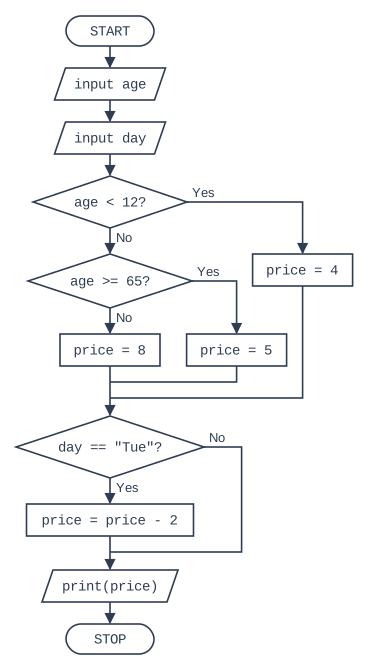
The flowchart below shows an algorithm used by a cinema to work out the price of a ticket.

State the output of the algorithm for each of these inputs:

age 8 and day "Mon"
age 70 and day "Tue"
age 12 and day "Sat"

Flowchart, read from the top. START, then the input/output box "input age", then the input/output box "input day", then the decision box "age < 12?" (if Yes, the process box "price = 4"; if No, the decision box "age >= 65?" (if Yes, the process box "price = 5"; if No, the process box "price = 8"); all 3 paths then join). After the paths join: the decision box 'day == "Tue"?' (if Yes, the process box "price = price - 2"; if No, nothing is done; the two paths then join). After the paths join: the input/output box "print(price)", then STOP.

Model answer

age 8 and "Mon": 4
age 70 and "Tue": 3
age 12 and "Sat": 8

Explanation

For age 8, age < 12 is true, so price = 4, and Monday is not "Tue", so 4 is output. For age 70, age < 12 is false and age >= 65 is true, so price = 5; it is Tuesday, so 2 is taken off, giving 3. For age 12, age < 12 is false (12 is not less than 12) and age >= 65 is false, so price = 8. Watch the boundary: the nested decisions are only reached on the No branch of the first one.

Mark scheme
  1. 1 mark

    age 8, "Mon": 4

    Accept £4.

  2. 1 mark

    age 70, "Tue": 3

    Accept £3. 5 (without the Tuesday reduction) is wrong.

  3. 1 mark

    age 12, "Sat": 8

    Accept £8. 4 is wrong: 12 < 12 is false.

Question 3

3 marks

Here is an algorithm written in OCR Exam Reference Language.

speed = int(input("Enter speed"))
if speed > 70 then
    print("Ticket")
else
    if speed > 60 then
        print("Warning")
    else
        print("OK")
    endif
endif

State the output when the speed entered is 71, when it is 70 and when it is 60.

Model answer

71: Ticket
70: Warning
60: OK

Explanation

71 > 70 is true, so "Ticket" is output. For 70, the first condition is false (70 is not greater than 70), so the nested if is checked: 70 > 60 is true, giving "Warning". For 60, both conditions are false (60 is not greater than 60), so "OK" is output. Boundary values like these are where > and >= give different results.

Mark scheme
  1. 1 mark

    71: Ticket

  2. 1 mark

    70: Warning

    70 > 70 is false.

  3. 1 mark

    60: OK

    60 > 60 is false.

Question 4

5 marks

A games website lets users into its chat room using these rules:

Users aged 16 or over are allowed in.
Users aged 13 to 15 are allowed in only if a parent has given permission.
Users under 13 are not allowed in.

Write an algorithm that inputs the user's age and, only when it is needed, asks whether a parent has given permission ("Y" or "N"). It then outputs "Allowed" or "Not allowed". Use nested selection.

You may write your answer in pseudocode, OCR Exam Reference Language, a high-level programming language or structured English.

Model answer

age = int(input("Enter your age"))
if age >= 16 then
    print("Allowed")
elseif age >= 13 then
    permission = input("Has a parent given permission? Y or N")
    if permission == "Y" then
        print("Allowed")
    else
        print("Not allowed")
    endif
else
    print("Not allowed")
endif

Explanation

The ages are checked from the top down: 16 or over first, then 13 or over (which, because of the first check, means 13 to 15), and anything else is under 13. The permission question is nested inside the 13 to 15 branch, so it is only asked when it is needed, and a second if inside that branch decides the output. Check the boundaries: 13 and 15 must both reach the permission check, and 16 must not.

Mark scheme
  1. 1 mark

    Inputs the age

    Accept pseudocode, ERL, a high-level language or precise structured English. max 5 from the six points.

  2. 1 mark

    Checks if age >= 16 and outputs "Allowed"

    Accept age > 15.

  3. 1 mark

    Checks for ages 13 to 15 (e.g. elseif age >= 13 after the first check / age >= 13 AND age <= 15)

    Accept age > 12. Do not accept age > 13 (13 would be excluded).

  4. 1 mark

    Asks for permission only for ages 13 to 15 (the input is inside that branch)

    Asking every user for permission does not earn this mark.

  5. 1 mark

    Nested selection: outputs "Allowed" if permission is "Y", otherwise "Not allowed"

    The permission check must be inside the 13 to 15 branch.

  6. 1 mark

    Outputs "Not allowed" for ages under 13

Ready to try the rest? Every answer you write is marked against the mark scheme, so you can see exactly where the marks are.

Study Helper Hints first, answers after you try

Stuck on this one? Ask for a hint and I’ll point you in the right direction, without giving the answer away. Once you’ve checked your answer, I’ll show you how the marks are awarded.