Level:
Correct: 0
Incorrect: 0
Marks: 0/0
Exam Practice
Course:
Topics:
OCR GCSE Computer Science (Paper 2) Smart practice A mixed round aimed at your weak spots
Unit 1
Algorithms
Unit 2
Programming fundamentals
Unit 3
Producing robust programs
Unit 4
Boolean logic
Unit 5
Programming languages and IDEs
Unit 6
Practical programming (Section B)
Avg
score:
–
Topics
done:
0/31

Records and SQL

Practise 32 exam-style questions on Records and SQL for OCR GCSE Computer Science (Paper 2). Write your answer as you would in the exam and get it marked in seconds against the mark scheme, point by point, with the Study Helper on hand if you get stuck.

  • 32 questions
  • 1–6 marks each
  • Instant marking
  • No sign-up needed
20 questions, marked as you go

Sample questions with model answers

Here are 4 of the questions in this topic, each with a model answer, an explanation of why it earns the marks and the mark scheme an examiner would use.

Question 1

1 mark

A recipe website stores its recipes in a database table called Recipes, shown in the table.

State how many records are returned by this SQL query:

SELECT Name FROM Recipes WHERE Calories <= 450 AND Minutes >= 20
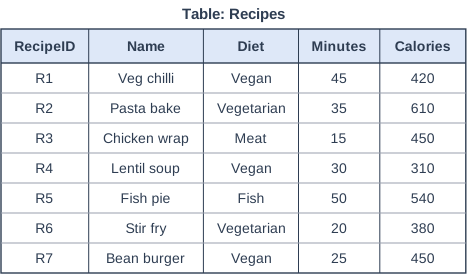
Table: Recipes. Table with columns "RecipeID", "Name", "Diet", "Minutes", "Calories". RecipeID: R1; Name: Veg chilli; Diet: Vegan; Minutes: 45; Calories: 420 | RecipeID: R2; Name: Pasta bake; Diet: Vegetarian; Minutes: 35; Calories: 610 | RecipeID: R3; Name: Chicken wrap; Diet: Meat; Minutes: 15; Calories: 450 | RecipeID: R4; Name: Lentil soup; Diet: Vegan; Minutes: 30; Calories: 310 | RecipeID: R5; Name: Fish pie; Diet: Fish; Minutes: 50; Calories: 540 | RecipeID: R6; Name: Stir fry; Diet: Vegetarian; Minutes: 20; Calories: 380 | RecipeID: R7; Name: Bean burger; Diet: Vegan; Minutes: 25; Calories: 450.

Model answer

4 (Veg chilli, Lentil soup, Stir fry and Bean burger)

Explanation

Both conditions must be true because they are joined by AND. Bean burger has exactly 450 calories and Stir fry takes exactly 20 minutes; both are included because <= and >= include the boundary value. Chicken wrap has 450 calories but takes only 15 minutes, so it fails the second condition.

Mark scheme
  1. 1 mark

    4

    The records are Veg chilli, Lentil soup, Stir fry and Bean burger. Correct answer only. 3 usually means a boundary record (Stir fry at exactly 20 minutes or Bean burger at exactly 450 calories) was missed; 5 usually means Chicken wrap (only 15 minutes) was wrongly included.
Question 2

2 marks

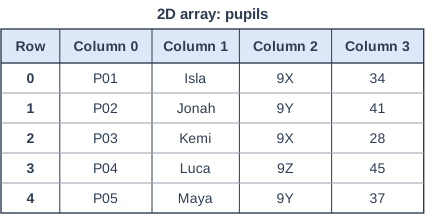
A teacher's program stores pupil records in a 2D array called pupils, shown in the table. Each row holds one record: column 0 is the pupil ID, column 1 the first name, column 2 the form and column 3 the test score. All values are stored as strings. The first index is the row and the second index is the column.

State the value of pupils[2,1] and the value of pupils[4,3].

2D array: pupils. Table with columns "Row", "Column 0", "Column 1", "Column 2", "Column 3". Row: 0; Column 0: P01; Column 1: Isla; Column 2: 9X; Column 3: 34 | Row: 1; Column 0: P02; Column 1: Jonah; Column 2: 9Y; Column 3: 41 | Row: 2; Column 0: P03; Column 1: Kemi; Column 2: 9X; Column 3: 28 | Row: 3; Column 0: P04; Column 1: Luca; Column 2: 9Z; Column 3: 45 | Row: 4; Column 0: P05; Column 1: Maya; Column 2: 9Y; Column 3: 37.

Model answer

pupils[2,1] = "Kemi"
pupils[4,3] = "37"

Explanation

Arrays are 0-indexed, so pupils[2,1] is the third row (P03) and the second column (the first name): Kemi. pupils[4,3] is the fifth row (Maya) and the fourth column (the score): "37". It is stored as a string, so it would need casting with int() before being used in a calculation.

Mark scheme
  1. 1 mark

    pupils[2,1] is Kemi

    Accept with or without quotation marks. Do not accept Jonah or P02 (rows or columns counted from 1) or 9Y (row and column swapped).

  2. 1 mark

    pupils[4,3] is 37

    Accept "37" with or without quotation marks. Do not accept 9Z (counted from 1).

Question 3

3 marks

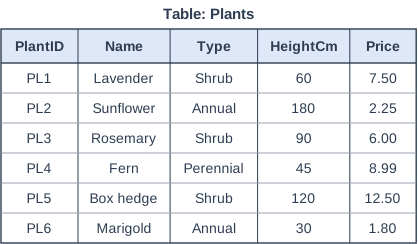
A garden centre stores details of its plants in a database table called Plants, shown in the table. A student wrote this query to show the name and price of every shrub, but it contains two errors.

SELECT Name, Price WHERE Type = Shrub FROM Plants

Identify the two errors and write the corrected query.

Table: Plants. Table with columns "PlantID", "Name", "Type", "HeightCm", "Price". PlantID: PL1; Name: Lavender; Type: Shrub; HeightCm: 60; Price: 7.50 | PlantID: PL2; Name: Sunflower; Type: Annual; HeightCm: 180; Price: 2.25 | PlantID: PL3; Name: Rosemary; Type: Shrub; HeightCm: 90; Price: 6.00 | PlantID: PL4; Name: Fern; Type: Perennial; HeightCm: 45; Price: 8.99 | PlantID: PL5; Name: Box hedge; Type: Shrub; HeightCm: 120; Price: 12.50 | PlantID: PL6; Name: Marigold; Type: Annual; HeightCm: 30; Price: 1.80.

Model answer

Error 1: FROM Plants comes after the WHERE clause; it must come straight after the list of fields.
Error 2: Shrub is a text value, so it must be in quotation marks.

SELECT Name, Price
FROM Plants
WHERE Type = 'Shrub'

Explanation

SQL clauses must be in the order SELECT, FROM, WHERE. Without quotes, Shrub would be treated as the name of a field, and there is no field called Shrub. The corrected query returns Lavender (7.50), Rosemary (6.00) and Box hedge (12.50).

Mark scheme
  1. 1 mark

    the FROM clause must come before the WHERE clause // FROM Plants is in the wrong place

  2. 1 mark

    Shrub is text, so it must be in quotation marks ('Shrub')

    Accept 'Shrub needs speech marks'.

  3. 1 mark

    corrected query: SELECT Name, Price FROM Plants WHERE Type = 'Shrub'

    Needs both corrections and no new errors. Accept double quotes. Ignore the case of keywords, line breaks and a final semicolon.

Question 4

5 marks

A school stores test results in a database table called Students, shown in the table.

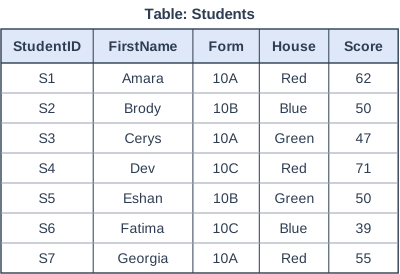
Write an SQL query that returns the first name and form of every student in Red house who scored from 50 to 70 inclusive.

Table: Students. Table with columns "StudentID", "FirstName", "Form", "House", "Score". StudentID: S1; FirstName: Amara; Form: 10A; House: Red; Score: 62 | StudentID: S2; FirstName: Brody; Form: 10B; House: Blue; Score: 50 | StudentID: S3; FirstName: Cerys; Form: 10A; House: Green; Score: 47 | StudentID: S4; FirstName: Dev; Form: 10C; House: Red; Score: 71 | StudentID: S5; FirstName: Eshan; Form: 10B; House: Green; Score: 50 | StudentID: S6; FirstName: Fatima; Form: 10C; House: Blue; Score: 39 | StudentID: S7; FirstName: Georgia; Form: 10A; House: Red; Score: 55.

Model answer

SELECT FirstName, Form
FROM Students
WHERE House = 'Red' AND Score >= 50 AND Score <= 70

This returns Amara (10A) and Georgia (10A).

Explanation

'From 50 to 70 inclusive' needs two conditions, Score >= 50 and Score <= 70, and all three conditions must be true, so they are joined with AND. Dev is in Red house but scored 71, so the upper limit correctly leaves him out. Writing > 50 instead of >= 50 is a common error: it would leave out anyone who scored exactly 50.

Mark scheme
  1. 1 mark

    SELECT FirstName, Form

    Both fields needed, in either order. Ignore the case of keywords, line breaks and a final semicolon. SELECT * does not earn this mark.

  2. 1 mark

    FROM Students

  3. 1 mark

    WHERE House = 'Red'

    'Red' must be in quotes. The three conditions may be in any order.

  4. 1 mark

    AND Score >= 50

    Accept Score > 49. Do not accept Score > 50. Must be joined with AND.

  5. 1 mark

    AND Score <= 70

    Accept Score < 71. Do not accept Score < 70. Must be joined with AND. Accept Score BETWEEN 50 AND 70 for the fourth and fifth marks.

Ready to try the rest? Every answer you write is marked against the mark scheme, so you can see exactly where the marks are.

Study Helper Hints first, answers after you try

Stuck on this one? Ask for a hint and I’ll point you in the right direction, without giving the answer away. Once you’ve checked your answer, I’ll show you how the marks are awarded.