Level:
Correct: 0
Incorrect: 0
Marks: 0/0
Exam Practice
Course:
Topics:
OCR GCSE Computer Science (Paper 2) Smart practice A mixed round aimed at your weak spots
Unit 1
Algorithms
Unit 2
Programming fundamentals
Unit 3
Producing robust programs
Unit 4
Boolean logic
Unit 5
Programming languages and IDEs
Unit 6
Practical programming (Section B)
Avg
score:
–
Topics
done:
0/31

Input validation

Practise 29 exam-style questions on Input validation for OCR GCSE Computer Science (Paper 2). Write your answer as you would in the exam and get it marked in seconds against the mark scheme, point by point, with the Study Helper on hand if you get stuck.

  • 29 questions
  • 1–8 marks each
  • Instant marking
  • No sign-up needed
20 questions, marked as you go

Sample questions with model answers

Here are 4 of the questions in this topic, each with a model answer, an explanation of why it earns the marks and the mark scheme an examiner would use.

Question 1

1 mark

Name the type of validation check that makes sure a value entered is a number and not text.

Model answer

Type check

Explanation

A type check makes sure data is of the expected data type, such as an integer. It is often needed before casting, because int("ten") would cause a run-time error.

Mark scheme
  1. 1 mark

    type check

    Do not accept format check or range check.

Question 2

2 marks

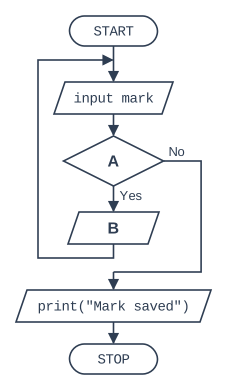
The flowchart below shows an algorithm that validates a test mark. A valid mark is a whole number from 0 to 100 inclusive. When an invalid mark is entered, the algorithm outputs an error message and asks for the mark again.

State what should be written in box A and in box B.

Flowchart, read from the top. START, then the input/output box "input mark", then decision box A (if Yes, input/output box B, then the flow line goes back up to the input/output box "input mark"; if No, the loop ends). After the loop: the input/output box 'print("Mark saved")', then STOP.

Model answer

A: mark < 0 OR mark > 100?
B: print("Invalid mark")

Explanation

The Yes exit of decision A leads to box B and then back to the input, so A must be true for an invalid mark: below 0 or above 100. Box B must therefore be the error message. When the mark is valid the No exit leaves the loop and the mark is saved.

Mark scheme
  1. 1 mark

    A: mark < 0 OR mark > 100?

    Accept with or without the question mark. Accept NOT(mark >= 0 AND mark <= 100), and mark <= -1 OR mark >= 101. Do not accept AND.

  2. 1 mark

    B: print("Invalid mark") / output an error message

    Any output that tells the user the mark is invalid.

Question 3

3 marks

Write code that asks the user to enter the name of their town and keeps asking until something has been entered.

Write the code using OCR Exam Reference Language or a high-level programming language.

Model answer

town = input("Enter your town")
while town == ""
    town = input("Town cannot be blank. Enter your town")
endwhile

Explanation

This is a presence check: an empty string means the user pressed Enter without typing anything. The loop repeats only while the input is blank. The same check can be written as do town = input("Enter your town") until town != "".

Mark scheme
  1. 1 mark

    inputs the town

    Answers must be in OCR Exam Reference Language or a high-level programming language (e.g. Python); pseudocode, natural English or bullet points score 0. Ignore minor syntax errors.

  2. 1 mark

    checks whether the input is blank, e.g. town == "" / town.length == 0

  3. 1 mark

    asks again, inside a loop, while the input is blank

    Accept a do ... until town != "" loop for this mark and the first.

Question 4

5 marks

A programmer wants one function that can validate many different whole-number inputs, for example month = getNumber(1, 12) or day = getNumber(1, 31).

Write a function called getNumber that takes a lowest and a highest allowed value as parameters. It should ask the user for a whole number, keep asking until the number is from the lowest to the highest value inclusive, and then return it.

You may assume that the user always types a whole number.

Write the function using OCR Exam Reference Language or a high-level programming language.

Model answer

function getNumber(low, high)
    num = int(input("Enter a number from " + str(low) + " to " + str(high)))
    while num < low OR num > high
        print("Out of range")
        num = int(input("Enter a number from " + str(low) + " to " + str(high)))
    endwhile
    return num
endfunction

Explanation

Using parameters for the limits means one range check can be reused for any input, which is better than writing a separate loop each time. The function must return the number so the calling code can store it, as in month = getNumber(1, 12). Check the boundaries: num < low OR num > high accepts both low and high.

Mark scheme
  1. 1 mark

    function getNumber defined with two parameters

    Answers must be in OCR Exam Reference Language or a high-level programming language (e.g. Python); pseudocode, natural English or bullet points score 0. Ignore minor syntax errors.

  2. 1 mark

    inputs a number, inside the function

    Ignore a missing int() cast: it is a minor syntax slip and casting is not what this question tests.

  3. 1 mark

    the validation condition uses the parameters, e.g. num < low OR num > high

    Do not award if fixed values such as 1 and 12 are used.

  4. 1 mark

    asks again inside a loop until the number is valid

  5. 1 mark

    returns the valid number after the loop

    Do not award if the number is only output.

Ready to try the rest? Every answer you write is marked against the mark scheme, so you can see exactly where the marks are.

Study Helper Hints first, answers after you try

Stuck on this one? Ask for a hint and I’ll point you in the right direction, without giving the answer away. Once you’ve checked your answer, I’ll show you how the marks are awarded.