
Level:
Correct: 0
Incorrect: 0
Marks: 0/0
Exam Practice
Course:
Topics:
OCR GCSE Computer Science (Paper 2) Smart practice A mixed round aimed at your weak spots
Unit 1
Algorithms
Unit 2
Programming fundamentals
Unit 3
Producing robust programs
Unit 4
Boolean logic
Unit 5
Programming languages and IDEs
Unit 6
Practical programming (Section B)
Avg
score:
–
Topics
done:
0/31

File handling

Practise 26 exam-style questions on File handling for OCR GCSE Computer Science (Paper 2). Write your answer as you would in the exam and get it marked in seconds against the mark scheme, point by point, with the Study Helper on hand if you get stuck.

  • 26 questions
  • 1–8 marks each
  • Instant marking
  • No sign-up needed
20 questions, marked as you go

Sample questions with model answers

Here are 4 of the questions in this topic, each with a model answer, an explanation of why it earns the marks and the mark scheme an examiner would use.

Question 1

2 marks

Give two reasons why a program should close a file when it has finished using it.

Model answer

Closing the file releases it so that other programs and users can open it. It also makes sure that everything the program has written is saved to the file and frees the memory the open file was using.

Explanation

While a file is open, the operating system may lock it and keep some of the data waiting in memory before writing it to storage. Calling close() (myFile.close() in OCR Exam Reference Language) finishes the writing, frees those resources and lets other programs use the file. Closing a file does not delete it or its contents.

Mark scheme
  1. 1 mark

    so that other programs or users can open and use the file / the file is no longer locked

    Max 2 marks from 4 mark points; award one mark per different reason.

  2. 1 mark

    makes sure all the data written to the file is saved / stops data being lost

  3. 1 mark

    frees up memory or other resources used by the open file

  4. 1 mark

    prevents the file being accidentally changed or corrupted later in the program

    Do not accept 'to save space' or 'to delete the file'.
Question 2

2 marks

The text file diary.txt already contains several lines. This code is run.

diaryFile = open("diary.txt")
diaryFile.writeLine("Swimming moved to 5pm")
diaryFile.close()

Describe what happens to the contents of diary.txt.

Model answer

The text "Swimming moved to 5pm" is written as a new line at the end of diary.txt. All the lines that were already in the file stay exactly as they were.

Explanation

In OCR Exam Reference Language, writeLine always writes at the end of the file, so writing to an existing file adds to it rather than replacing it. The file was opened with open, not created with newFile, so its contents are not cleared. close() then makes sure the new line is saved.

Mark scheme
  1. 1 mark

    the line Swimming moved to 5pm is added as a new line at the end of the file

    Must say where it is added (the end / after the existing lines).

  2. 1 mark

    the existing lines are kept unchanged (they are not overwritten or deleted)

Question 3

4 marks

Write a program that creates a new text file called team.txt and writes the names Asha, Ben and Cara into it, one name per line.

Write the program using OCR Exam Reference Language or a high-level programming language.

Model answer

newFile("team.txt")
teamFile = open("team.txt")
teamFile.writeLine("Asha")
teamFile.writeLine("Ben")
teamFile.writeLine("Cara")
teamFile.close()

Explanation

In OCR Exam Reference Language, newFile creates the empty file but does not open it, so open is still needed to get a file variable to write with. Each writeLine call adds one line to the end of the file, so the names appear in the order they are written. Closing the file at the end makes sure everything is saved.

Mark scheme
  1. 1 mark

    creates the file: newFile("team.txt")

    Answers must be in OCR Exam Reference Language or a high-level programming language (e.g. Python); pseudocode, natural English or bullet points score 0. Ignore minor syntax errors. Python open("team.txt", "w") creates and opens the file: award this mark and the next.

  2. 1 mark

    opens the file and stores it in a variable, e.g. teamFile = open("team.txt")

  3. 1 mark

    writes each of the three names on its own line using writeLine

    All three names needed. Accept a loop over an array of the names. Accept Python write("Asha
    ") etc.

  4. 1 mark

    closes the file

    Must be after the last write.

Question 4

6 marks

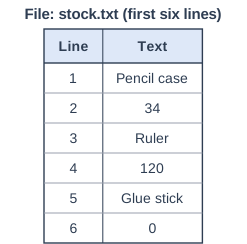
A shop keeps its stock levels in a text file called stock.txt. Each product takes two lines: the product name on one line and the quantity in stock on the next. The table shows the first six lines of the file; the full file is longer.

Write a program that asks the user for a product name, searches the file, and outputs the quantity in stock for that product, or "Not found" if the product is not in the file.

Write the program using OCR Exam Reference Language or a high-level programming language.

File: stock.txt (first six lines). Table with columns "Line", "Text". Line: 1; Text: Pencil case | Line: 2; Text: 34 | Line: 3; Text: Ruler | Line: 4; Text: 120 | Line: 5; Text: Glue stick | Line: 6; Text: 0.

Model answer

product = input("Enter product name")
stockFile = open("stock.txt")
found = False
while NOT stockFile.endOfFile()
    name = stockFile.readLine()
    quantity = stockFile.readLine()
    if name == product then
        print(quantity)
        found = True
    endif
endwhile
stockFile.close()
if found == False then
    print("Not found")
endif

Explanation

Each record in the file takes two lines, so the loop calls readLine() twice per pass: once for the name and once for the quantity that goes with it. A Boolean flag records whether a match was found, and "Not found" is decided only after the loop, once every product has been checked. A common error is printing "Not found" inside the loop each time a different product is read. For example, entering Ruler outputs 120.

Mark scheme
  1. 1 mark

    inputs a product name

    Answers must be in OCR Exam Reference Language or a high-level programming language (e.g. Python); pseudocode, natural English or bullet points score 0. Ignore minor syntax errors. Max 6 marks from 8 mark points.

  2. 1 mark

    opens stock.txt

  3. 1 mark

    uses a loop that repeats until the end of the file (or until the product is found)

    e.g. while NOT stockFile.endOfFile(). Do not accept a fixed number of repetitions.

  4. 1 mark

    reads two lines on each pass: the product name and then its quantity

    Do not award if only one line is read per pass, so names and quantities get mixed up.

  5. 1 mark

    compares the name read from the file with the name entered

  6. 1 mark

    outputs the quantity when the names match

  7. 1 mark

    outputs "Not found" only after the whole file has been searched with no match, e.g. using a Boolean flag

    Do not award if "Not found" is output inside the loop for every product that does not match.

  8. 1 mark

    closes the file

Ready to try the rest? Every answer you write is marked against the mark scheme, so you can see exactly where the marks are.

Study Helper Hints first, answers after you try

Stuck on this one? Ask for a hint and I’ll point you in the right direction, without giving the answer away. Once you’ve checked your answer, I’ll show you how the marks are awarded.