
Level:
Correct: 0
Incorrect: 0
Marks: 0/0
Exam Practice
Course:
Topics:
OCR GCSE Computer Science (Paper 2) Smart practice A mixed round aimed at your weak spots
Unit 1
Algorithms
Unit 2
Programming fundamentals
Unit 3
Producing robust programs
Unit 4
Boolean logic
Unit 5
Programming languages and IDEs
Unit 6
Practical programming (Section B)
Avg
score:
–
Topics
done:
0/31

Variables, constants, inputs, outputs and assignment

Practise 29 exam-style questions on Variables, constants, inputs, outputs and assignment for OCR GCSE Computer Science (Paper 2). Write your answer as you would in the exam and get it marked in seconds against the mark scheme, point by point, with the Study Helper on hand if you get stuck.

  • 29 questions
  • 1–6 marks each
  • Instant marking
  • No sign-up needed
20 questions, marked as you go

Sample questions with model answers

Here are 4 of the questions in this topic, each with a model answer, an explanation of why it earns the marks and the mark scheme an examiner would use.

Question 1

1 mark

A program must ask the user for their age and store it as a whole number in the variable age.

Which line does this correctly?

A    age = input(int("Enter your age"))
B    age = int(input("Enter your age"))
C    int(age) = input("Enter your age")
D    input(age) = "Enter your age"

Choose your answer.

  • A
  • B
  • C
  • D

Model answer

B: age = int(input("Enter your age"))

Explanation

input() runs first, displaying the prompt and returning what the user types as a string. int() then converts that string to an integer, and the assignment stores it in age. The variable being assigned must be on its own on the left of =, which rules out C and D, and in A int() is wrongly applied to the prompt instead of to the user's input.

Mark scheme
  1. 1 mark

    B / age = int(input("Enter your age"))

    Accept the letter B or the line itself. A tries to convert the prompt text to an integer; C and D have a function call on the left of the assignment, which is not allowed. If more than one option is given, 0 marks.
Question 2

2 marks

This program converts distances and speeds from miles to kilometres.

distance = float(input("Enter a distance in miles"))
km = distance * 1.609
print(str(distance) + " miles is " + str(km) + " km")
limit = float(input("Enter a speed limit in mph"))
kmh = limit * 1.609
print("That is " + str(kmh) + " km/h")

Rewrite the program so that the conversion factor 1.609 is stored as a constant and the constant is used instead of 1.609.

You must use OCR Exam Reference Language or a high-level programming language.

Model answer

const kmPerMile = 1.609
distance = float(input("Enter a distance in miles"))
km = distance * kmPerMile
print(str(distance) + " miles is " + str(km) + " km")
limit = float(input("Enter a speed limit in mph"))
kmh = limit * kmPerMile
print("That is " + str(kmh) + " km/h")

Explanation

The constant is declared once, before the first line that uses it, and each 1.609 is replaced by its identifier. The program gives exactly the same results, but it is easier to read (kmPerMile explains what 1.609 is) and the value can be changed in one place if more accuracy is needed. The constant cannot be overwritten while the program runs.

Mark scheme
  1. 1 mark

    declares a constant with the value 1.609 (at the start / before it is used), e.g. const kmPerMile = 1.609

    Answers must be in OCR Exam Reference Language or a high-level programming language (e.g. Python); pseudocode, natural English or bullet points score 0. Ignore minor syntax errors. Python: accept an upper-case name such as KM_PER_MILE = 1.609.

  2. 1 mark

    uses the constant in both calculations (instead of 1.609)

    Both lines must use the constant, and the rest of the program must still work. Do not award if 1.609 is still typed in either calculation.

Question 3

3 marks

A sports centre wants a program to greet new members.

Write a program that asks the user to enter their first name and then their favourite sport, and then outputs a message that includes both, in this form:

Hi Ravi, welcome to the tennis club!

You must use OCR Exam Reference Language or a high-level programming language.

Model answer

name = input("Enter your first name")
sport = input("Enter your favourite sport")
print("Hi " + name + ", welcome to the " + sport + " club!")

Explanation

Each input is stored in its own variable, and the output joins (concatenates) fixed strings with the two variables. The spaces must be inside the fixed strings, e.g. "Hi " with a space, or the words run together. No casting is needed, because both inputs are text. Putting a variable name inside quotation marks outputs its name rather than its value.

Mark scheme
  1. 1 mark

    inputs the first name (and stores it in a variable)

    Answers must be in OCR Exam Reference Language or a high-level programming language (e.g. Python); pseudocode, natural English or bullet points score 0. Ignore minor syntax errors.

  2. 1 mark

    inputs the favourite sport (and stores it in a variable)

  3. 1 mark

    outputs a message joining fixed text with both input values, in the order shown

    Accept concatenation with + or values separated by commas in print. The variables must not be inside quotation marks (print("Hi name") scores 0 for this mark). Ignore small differences in spacing or punctuation.

Question 4

4 marks

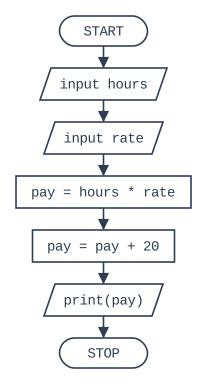
The flowchart below shows an algorithm that works out a worker's weekly pay, including a fixed bonus.

Write this algorithm using OCR Exam Reference Language or a high-level programming language.

Flowchart, read from the top. START, then the input/output box "input hours", then the input/output box "input rate", then the process box "pay = hours * rate", then the process box "pay = pay + 20", then the input/output box "print(pay)", then STOP.

Model answer

hours = float(input("Enter hours worked"))
rate = float(input("Enter hourly rate"))
pay = hours * rate
pay = pay + 20
print(pay)

Explanation

Each flowchart box becomes one statement, in the same order: the two parallelograms are inputs, the two rectangles are assignments and the last parallelogram is an output. For example, 10 hours at £12 per hour gives 120 + 20 = £140. The order matters - outputting pay before adding the bonus would give the wrong result.

Mark scheme
  1. 1 mark

    inputs hours and rate (and stores them in variables)

    Answers must be in OCR Exam Reference Language or a high-level programming language (e.g. Python); pseudocode, natural English or bullet points score 0. Ignore minor syntax errors. Both inputs are needed for this mark. Do not penalise a missing int()/float() conversion.

  2. 1 mark

    pay = hours * rate

  3. 1 mark

    adds 20 to pay, e.g. pay = pay + 20

    Accept pay = hours * rate + 20 as one line for this mark and the previous one.

  4. 1 mark

    outputs pay (after the bonus has been added)

    The steps must be in the order shown in the flowchart for this mark.

Ready to try the rest? Every answer you write is marked against the mark scheme, so you can see exactly where the marks are.

Study Helper Hints first, answers after you try

Stuck on this one? Ask for a hint and I’ll point you in the right direction, without giving the answer away. Once you’ve checked your answer, I’ll show you how the marks are awarded.