Practise 30 exam-style questions on Representing images: pixels and colour depth for AQA GCSE Computer Science (Paper 2). Write your answer as you would in the exam and get it marked in seconds against the mark scheme, point by point, with the Study Helper on hand if you get stuck.
30 questions
1–4 marks each
Instant marking
No sign-up needed
20 questions, marked as you go
Sample questions with model answers
Here are 4 of the questions in this topic, each with a model answer, an explanation of why it earns the marks and the mark scheme an examiner would use.
Question 1
1 mark
A digital painting app stores each pixel using a colour depth of 6 bits.
What is the maximum number of different colours that an image created in the app can contain?
Choose your answer.
6
12
36
64
Model answer
64, because 6 bits give 2⁶ = 64 different bit patterns.
Explanation
With n bits there are 2ⁿ different bit patterns, and each pattern can stand for one colour, so 6 bits give 2⁶ = 64 colours. 12 comes from doubling 6 and 36 from squaring it, and both are wrong. Each extra bit doubles the number of colours available.
Mark scheme
1 mark
64
Mark is for AO2 (apply). If more than one option is given, 0 marks.
Question 2
2 marks
The pixel data in a bitmap file is stored as one long sequence of bits, row by row, starting at the top left of the image.
Explain why the file must also store the width of the image in pixels and its colour depth.
Model answer
The width tells the computer how many pixels are in each row, so it knows where one row ends and the next row starts when it rebuilds the grid. The colour depth tells it how many bits make up each pixel, so it can split the sequence into the right-sized codes and look up each pixel's colour. Without these, the same 48 bits could be a 6 × 4 image with 2 bits per pixel or a 12 × 4 image with 1 bit per pixel.
Explanation
A bitmap's pixel data is just a stream of bits, so extra data (metadata) is needed to turn it back into a picture. The width splits the stream into rows and the colour depth splits each row into pixels. Answers that only say 'so it displays properly' do not explain what each value is used for.
Mark scheme
1 mark
the width shows how many pixels are in each row // where each row ends (and the next begins) // how to arrange the pixels in a grid
All marks AO1 (understanding). Do not award both marks for a single statement such as 'so the image can be displayed properly'.
1 mark
the colour depth shows how many bits belong to each pixel // where one pixel's code ends and the next begins // how to work out each pixel's colour from the bits
A. an example showing that the same bits could form different images, e.g. 48 bits could be 6 × 4 pixels at 2 bits each or 12 × 4 pixels at 1 bit each.
Question 3
2 marks
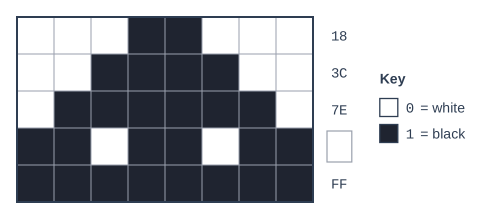
The figure shows a black and white bitmap image in which 0 represents white and 1 represents black. The code for each row is shown in hexadecimal, except for row 4.
State the hexadecimal code for row 4.
Model answer
Row 4 in binary is 11011011. 1101 = 8 + 4 + 1 = 13 = D 1011 = 8 + 2 + 1 = 11 = B So the hexadecimal code is DB.
Explanation
First write row 4 as binary (black = 1): 11011011. Then split it into two 4-bit nibbles and convert each to one hexadecimal digit: 1101 is 13 (D) and 1011 is 11 (B). Converting the whole byte to decimal first (219) is allowed as working but is not the answer asked for.
Mark scheme
1 mark
D (as the left-hand digit)
All marks AO2 (apply). Correct answer with no working scores full marks. Row 4 is 11011011: 1101 = D and 1011 = B. Maximum 1 mark if the final answer is not correct.
1 mark
B (as the right-hand digit)
A. DB followed by 'hex' or a subscript 16. R. 11011011 (binary) or 219 (decimal) for either mark.
Question 4
3 marks
Image A is 320 × 240 pixels with a colour depth of 8 bits. Image B is 400 × 300 pixels with a colour depth of 4 bits.
Calculate how many more bytes are needed to store Image A than Image B. Ignore any metadata.
Image B has more pixels (120 000 against 76 800) but half the colour depth, so it is still smaller. Work out each file size with width × height × colour depth, convert to bytes and subtract. Comparing only the numbers of pixels, or giving the difference in bits, are the common mistakes.
A. working in bits: 614 400 − 480 000 = 134 400 bits, ÷ 8 = 16 800 bytes. A. 16.8 kB. R. 134 400 as the final answer (bits, not bytes).
Ready to try the rest? Every answer you write is marked against the mark scheme, so you can see exactly where the marks are.
Ctrl + Enter to check
Study HelperHints first, answers after you try
Stuck on this one? Ask for a hint and I’ll point you in the right direction, without giving the answer away. Once you’ve checked your answer, I’ll show you how the marks are awarded.