Level:
Correct: 0
Incorrect: 0
Marks: 0/0
Exam Practice
Course:
Topics:
AQA GCSE Computer Science (Paper 2) Smart practice A mixed round aimed at your weak spots
Unit 1
3.3 Fundamentals of data representation
Unit 2
3.4 Computer systems
Unit 3
3.5 Fundamentals of computer networks
Unit 4
3.6 Cyber security
Fundamentals of cyber security; cyber security threats
Cyber security, its threats and penetration testing
Methods to detect and prevent cyber security threats
Detecting and preventing cyber security threats
Unit 5
3.7 Relational databases and SQL
Unit 6
3.8 Ethical, legal and environmental impacts
Ethical, legal and environmental impacts
Ethical, legal and environmental impacts of technology
Avg
score:
–
Topics
done:
0/22

Relational databases: tables, keys and redundancy

Practise 25 exam-style questions on Relational databases: tables, keys and redundancy for AQA GCSE Computer Science (Paper 2). Write your answer as you would in the exam and get it marked in seconds against the mark scheme, point by point, with the Study Helper on hand if you get stuck.

  • 25 questions
  • 1–4 marks each
  • Instant marking
  • No sign-up needed
20 questions, marked as you go

Sample questions with model answers

Here are 4 of the questions in this topic, each with a model answer, an explanation of why it earns the marks and the mark scheme an examiner would use.

Question 1

1 mark

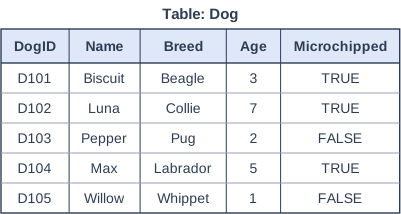
An animal rescue centre stores details of its dogs in a database. The figure shows the Dog table.

The data stored about Luna (D102, Luna, Collie, 7, TRUE) is an example of which of the following?

Choose your answer.

  • A field
  • A record
  • A primary key
  • A data type
Table: Dog. Table with columns "DogID", "Name", "Breed", "Age", "Microchipped". DogID: D101; Name: Biscuit; Breed: Beagle; Age: 3; Microchipped: TRUE | DogID: D102; Name: Luna; Breed: Collie; Age: 7; Microchipped: TRUE | DogID: D103; Name: Pepper; Breed: Pug; Age: 2; Microchipped: FALSE | DogID: D104; Name: Max; Breed: Labrador; Age: 5; Microchipped: TRUE | DogID: D105; Name: Willow; Breed: Whippet; Age: 1; Microchipped: FALSE.

Model answer

A record

Explanation

A record is one row of a table: all the data about one entity, here one dog. A field is one column, such as Breed, which holds one item of data for every record. The primary key is just the DogID field, not the whole row.

Mark scheme
  1. 1 mark

    A record

    Mark is for AO2 (apply). If more than one option is given, 0 marks.
Question 2

2 marks

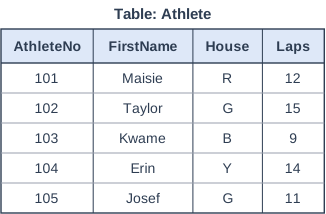
A school records the results of a sponsored run in the Athlete table shown in the figure. The House field stores a single letter for each pupil's house, and Laps is the number of complete laps run.

State the most suitable data type for the House field and for the Laps field.

Table: Athlete. Table with columns "AthleteNo", "FirstName", "House", "Laps". AthleteNo: 101; FirstName: Maisie; House: R; Laps: 12 | AthleteNo: 102; FirstName: Taylor; House: G; Laps: 15 | AthleteNo: 103; FirstName: Kwame; House: B; Laps: 9 | AthleteNo: 104; FirstName: Erin; House: Y; Laps: 14 | AthleteNo: 105; FirstName: Josef; House: G; Laps: 11.

Model answer

House: Character (Char)
Laps: Integer

Explanation

House always holds exactly one letter, so the character data type fits it (a string would also work). Laps counts complete laps, so it is always a whole number and should be an integer. Choosing real for Laps is a common mistake - real is for values that can have a fractional part, such as a time in seconds.

Mark scheme
  1. 1 mark

    House: Char // Character

    All marks AO2 (apply). A. String / Text for House.

  2. 1 mark

    Laps: Integer

    A. Int. R. Real / Float (only complete laps are counted).

Question 3

2 marks

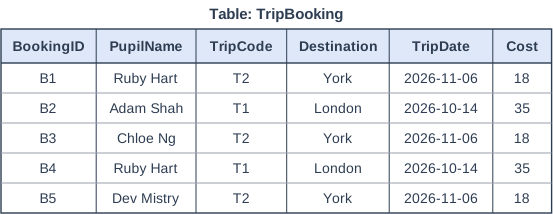
A school stores bookings for its trips in the single table TripBooking, shown in the figure.

Explain what is meant by data redundancy. Use an example from the table in your answer.

Table: TripBooking. Table with columns "BookingID", "PupilName", "TripCode", "Destination", "TripDate", "Cost". BookingID: B1; PupilName: Ruby Hart; TripCode: T2; Destination: York; TripDate: 2026-11-06; Cost: 18 | BookingID: B2; PupilName: Adam Shah; TripCode: T1; Destination: London; TripDate: 2026-10-14; Cost: 35 | BookingID: B3; PupilName: Chloe Ng; TripCode: T2; Destination: York; TripDate: 2026-11-06; Cost: 18 | BookingID: B4; PupilName: Ruby Hart; TripCode: T1; Destination: London; TripDate: 2026-10-14; Cost: 35 | BookingID: B5; PupilName: Dev Mistry; TripCode: T2; Destination: York; TripDate: 2026-11-06; Cost: 18.

Model answer

Data redundancy is when the same data is stored more than once. In the table, the details of trip T2 - York, 2026-11-06 and a cost of 18 - are repeated in three different bookings (B1, B3 and B5), when they only need to be stored once.

Explanation

Redundancy means duplicated data: each repeat wastes storage and creates another copy that must be kept the same as the others. In a relational design the trip details would be stored once in a Trip table, and each booking would hold just the TripCode as a foreign key. Defining redundancy as 'data that is never used' is a common misunderstanding.

Mark scheme
  1. 1 mark

    The same data is stored more than once // data is duplicated (unnecessarily)

    MS1 AO1 (understanding), MS2 AO2 (apply). NE. 'data that is not needed / not used' on its own (redundancy here means duplicated data).

  2. 1 mark

    An example of repeated data from the table, e.g. the destination, date and cost of trip T2 (York, 2026-11-06, 18) are stored in three records // the details of trip T1 are stored twice // Ruby Hart's name is stored twice

Question 4

3 marks

A holiday club uses a relational database with two tables: Child(ChildID, FirstName, Surname, Age) and Booking(BookingID, ChildID, Week, Activity). ChildID is the primary key of Child and a foreign key in Booking. A volunteer suggests linking the tables by storing each child's full name in the Booking table instead of ChildID.

Explain why ChildID is the better field to use to link the tables.

Model answer

ChildID has a different value for every child, but two children could have the same full name, so a booking linked by name might match the wrong child or more than one child. Each ChildID in Booking matches exactly one record in Child. Names can also be typed in different ways (such as Alfie or Alfie-James) or change, which would break the link, whereas an ID never changes. Storing full names in Booking would also duplicate data that is already in the Child table.

Explanation

A link between tables has to point to exactly one record, which is why the primary key of one table is used as the foreign key in the other. Names are not guaranteed to be unique and can be entered inconsistently, so they make poor keys. Good answers explain the consequence - a booking linked to the wrong child - rather than just saying names are not unique.

Mark scheme
  1. 1 mark

    ChildID has a different / unique value for every child, but names may not be unique (two children could have the same name)

    All marks AO2 (apply). Max 3.

  2. 1 mark

    so each ChildID in Booking links to exactly one child // with names, a booking could be linked to the wrong child / to more than one child

  3. 1 mark

    names can be typed or spelled in different ways / can change, which would break the link // an ID does not change

  4. 1 mark

    storing full names in Booking would duplicate data already in the Child table (redundancy), and the copies could become inconsistent

Ready to try the rest? Every answer you write is marked against the mark scheme, so you can see exactly where the marks are.

Study Helper Hints first, answers after you try

Stuck on this one? Ask for a hint and I’ll point you in the right direction, without giving the answer away. Once you’ve checked your answer, I’ll show you how the marks are awarded.